Woodpecker Review 2026: Cold email that actually lands — without torching your domain

By Annie Cole · Lead Reviewer & Software Editor
Annie Cole leads Toolisme's Software category. With a background in content marketing and journalism, she built the scoring rubric used acro
Woodpecker treats 'don't kill the domain' as the whole point: deliverability monitoring, human-like sending, free email verification, and unlimited inboxes at no extra cost. It's the safe pick for small teams that care about domain safety above raw volume.
Our Verdict
Woodpecker treats 'don't kill the domain' as the whole point: deliverability monitoring, human-like sending, free email verification, and unlimited inboxes at no extra cost. It's the safe pick for small teams that care about domain safety above raw volume.
Who It's For
Small teams just starting outbound, B2B companies that care about domain safety, agencies juggling multiple clients
Who Should Skip
Teams that want maximum volume at the lowest per-email cost, or heavy image/video visual personalization
Woodpecker Review 2026: Cold Email That Lands Without Torching Your Domain
The most common cold-email disaster goes like this: a team imports a few thousand addresses, hits send, and wakes up to a blacklisted domain. The reason is usually stupid-simple — a list full of hard-bounce addresses. Once the sending servers flag "invalid-address ratio too high," the sender's reputation gets dumped straight into the spam pile, and a tool that never verified the list never warned them.
That's the most expensive tuition in cold email. It's not the software that costs you — it's the domain. Kill a domain and half a year of cold-email assets go to zero.
So the first criterion for picking a cold email tool isn't "how fast does it send." It's "will it keep my domain alive." Woodpecker is built around that exact question.
This review is research-based, not hands-on: we did not migrate a live campaign of our own. What follows is drawn from Woodpecker's official documentation, pricing page, and real-user feedback across G2, Capterra, Trustpilot, and Reddit (collected August 2026).
The Verdict in One Sentence
| Item | Detail |
|---|---|
| Starting price | $35/mo (500 contacts, monthly); ~$23/mo annual |
| Free trial | 14 days, no credit card required |
| Rating | G2 4.4/5 · Capterra 4.5/5 (active users) |
| Core strength | Deliverability monitoring + human-like sending |
| Hidden gem | Unlimited inboxes at no extra cost |
| Bottom line | If you want cold email that actually lands without torching your domain, this is the safe pick |
Who it's for: small teams just starting outbound · B2B companies that care about domain safety and brand reputation · agencies juggling multiple clients. Who should skip it: teams that want maximum volume at the lowest per-email cost, or heavy image/video visual personalization.
🚀 Start Your 14-Day Free Trial (No Credit Card) →
The Company Behind It
Woodpecker was founded in 2015 in Wrocław, Poland by Matt Tarczynski and Maciej Cieśla. It's now a publicly traded company on the Warsaw Stock Exchange (ticker: WPR).
In a category full of newcomers, it's the veteran. While newer tools pile on "high-volume sending" quotas, Woodpecker went the opposite direction: compliance, deliverability, one-to-one personalization.
It hasn't drifted much since. It turned "protect your sending domains" into the product's main line.
How It Stays Out of the Spam Folder
Cold email has two big failure points: getting detected as a script, and your domain reputation collapsing. Woodpecker's whole stack revolves around those two:
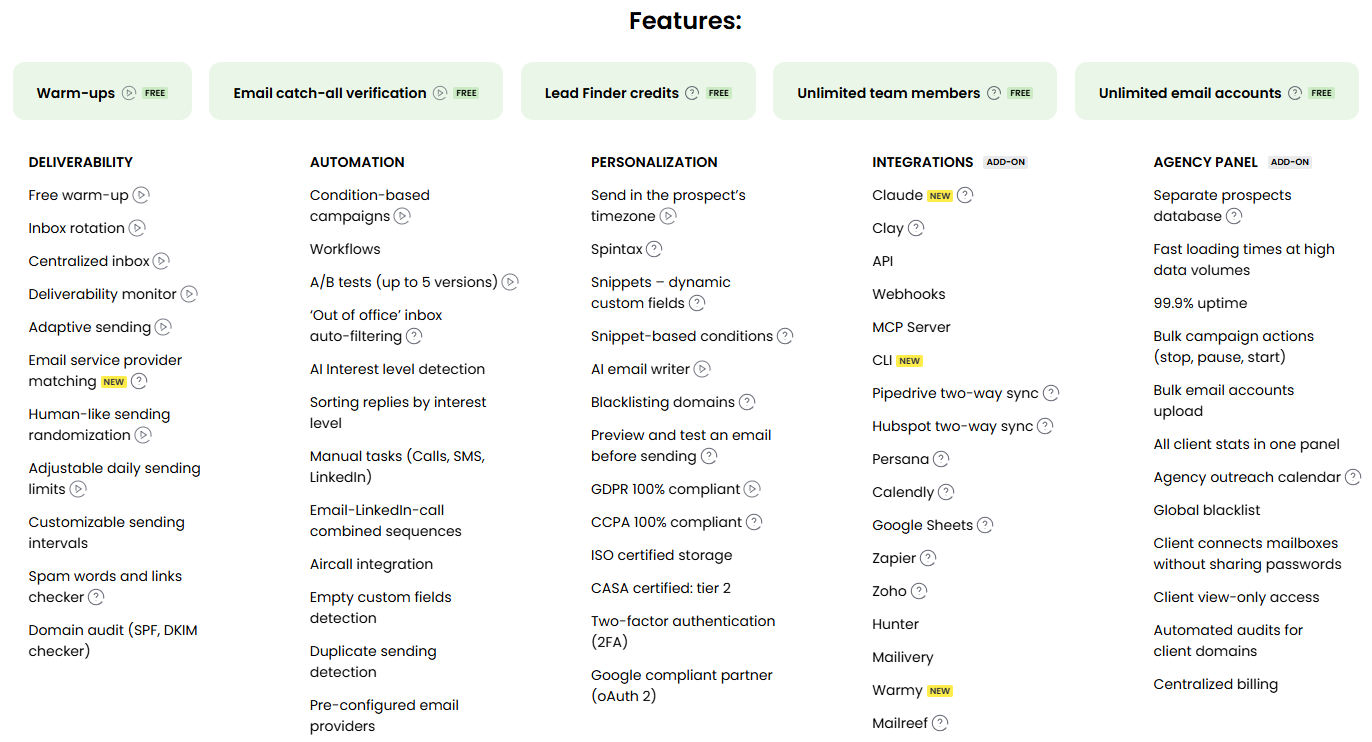
- Human-like sending. Random delays between sends, send times spread out — Gmail and Outlook can't instantly tell it's a bot.
- Adaptive throttling. When bounce rates start climbing, it eases off the gas instead of plowing through.
- Free email verification (Bounce Shield). It checks the list before sending and keeps hard bounces out of the queue. Users report it flagging a batch of invalid addresses right after import, before they ever touch the sending queue.
- Free warm-up. New inboxes build reputation gradually, no separate warm-up tool to buy.
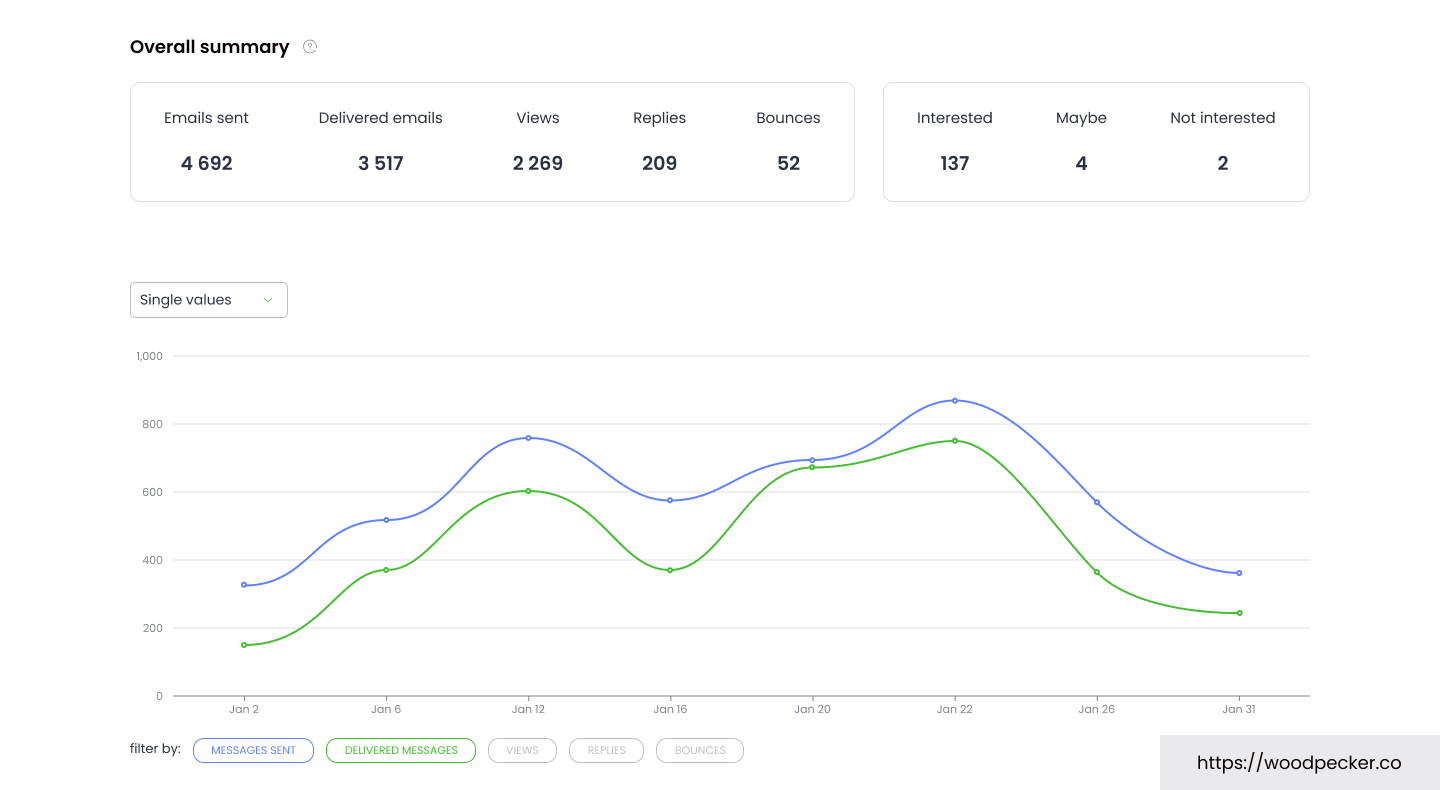
- Deliverability Monitor. Sends your domains into green/yellow/red tiers and alerts you when reputation dips. Users who keep their lists clean report holding a green tier, which is the whole point of the tool.
Compliance is real too: GDPR and CCPA, ISO-certified storage, CASA Tier 2, Google compliance partner (oAuth 2), plus 2FA.
Developers get looked after as well: built-in Claude AI, MCP server, CLI, plus API/webhooks that connect to Clay, Pipedrive, HubSpot, Zapier, Calendly.
Want to test your own domain's deliverability first? Start the free 14-day trial →
Features, Broken Down
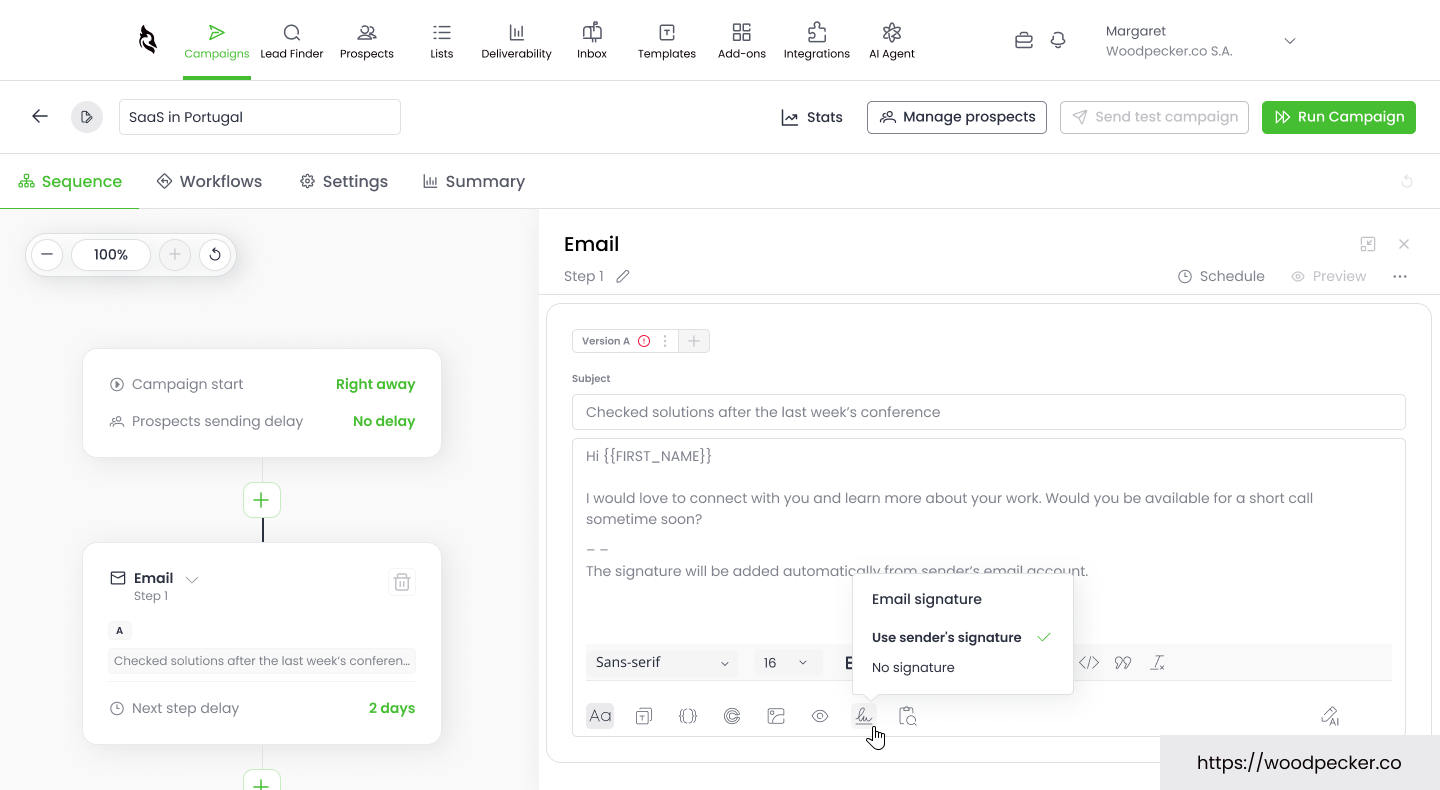
Email sequences + condition logic. It routes follow-ups based on opens, clicks, replies. A/B tests up to 5 variants, with spintax for personalization. Reviewers report connecting an inbox to a running sequence in about 10 minutes — the editor below shows a sample campaign with a {{FIRST_NAME}} placeholder and a delay between steps.
Unlimited inboxes. This is the most practical thing about it. Most tools charge per extra mailbox; Woodpecker doesn't — connect as many as you want on the same plan. Inbox-rotation teams save real money here.
Lead Finder + Agency Panel. There's a built-in B2B lead database (credit-based), and agencies can manage multiple clients through the Agency Panel. Both are add-ons with their own pricing.
The honest downsides:
- The bill stacks up. $35 is just the 500-contact entry point. Add LinkedIn automation (+$29/account/mo), API/MCP access (+$20/mo), extra warm-up slots (+$5/inbox) and the number climbs. Do the full math before you scale.
- Free warm-up is solid, not magic. Some users report emails still landing in spam after warming up. If the domain's history is already bad, no tool resurrects it — warm-up maintains reputation, it doesn't revive it.
- Cancellation gets complaints. Quite a few Trustpilot reviews gripe about the cancellation process once a card is on file. Our advice: use the full 14-day no-card trial before committing, keep screenshots when you cancel, and if it's a short project, pay with a virtual card (like Privacy.com) or set a calendar reminder.
Pricing (verified August 2026)
Woodpecker bills by new contacts added per month, not by emails sent or inboxes connected. Live prices:
| Tier | Contacts/mo | Monthly | Annual (~) | What's included |
|---|---|---|---|---|
| Starter | 500 | $35 | ~$23 | 8,000 emails, 2,000 storage, 2 warm-ups, 100 Lead Finder credits, unlimited inboxes/members, free verification |
| Sliding scale | +100 | +$7/100 | proportional | scales linearly |
| LinkedIn add-on | per account | +$29 | — | multi-channel |
| Integrations / API / MCP / CLI | — | +$20 | — | developers |
| Extra warm-up | per inbox | +$5 | — | high-volume sending |
| Agency Panel | per active client | +$27 | — | multi-client management |
💡 Billing gotcha, read this before you budget: Woodpecker counts new contacts per month. Five follow-up emails to the same person do not eat extra credits, and there's no per-inbox fee. That's a real win for follow-up-heavy teams.
Should You Pick It?
- Small team / SDR just starting outbound → Yes. Fast to learn, deliverability is stable, no need to wrestle a complex system on day one.
- B2B company that cares about domain safety and brand → Yes. Compliance and monitoring are its strengths.
- Agency managing multiple clients → Yes with the Agency Panel; if you're a pure volume play, glance at Smartlead.
- Maximum volume, lowest per-email cost, brand be damned → Instantly is friendlier on price at scale.
- Heavy image/video visual personalization → Lemlist does that better.
- Tens of thousands of contacts per month → Run the numbers first; Instantly or Smartlead may win.
Quick pick table:
| Your core need | Pick | Why |
|---|---|---|
| Keep the domain safe, easy start, multi-inbox rotation | Woodpecker | Built-in deliverability monitor, adaptive throttling, free warm-up |
| Maximum volume at the lowest cost per send | Instantly | Cheap at scale, fine if you don't care about domain burn |
| Agency managing many clients | Smartlead | Best-value agency multi-tenant panel |
| Strong visual / dynamic image personalization | Lemlist | Better image and video personalization |
💡 The full-stack move: find leads → send them safely. Our Snov.io review shows how to pull verified B2B leads; feed those into Woodpecker and it sends with human-like pacing while its free warm-up and Deliverability Monitor guard the domain. If you want extra heat on a domain, layer on WarmupInbox (we've reviewed it too). Find, send, protect — the whole loop closes.
Bottom Line
If your biggest fear is "cold email goes to spam and takes my domain down with it," Woodpecker is the option you can sleep on. Not the cheapest, not the flashiest — but it makes domain safety the default.
The 14-day no-credit-card trial is enough to run 500 contacts through the Deliverability Monitor and see for yourself.
🚀 Start Your 14-Day Free Trial (No Credit Card) →
Transparency & Sources
- Pricing and features verified August 2026, source woodpecker.co/pricing (live official prices; promos fluctuate — the official page wins).
- Ratings from G2 (4.4/5) and Capterra (4.5/5) active-user reviews; Trustpilot (~2.9/5) low scores concentrate on billing and cancellation, not sending quality — included honestly in the cons.
- Real-user signal: G2, Capterra, Trustpilot, Reddit cold-email threads, and several 2026 independent reviews.
- This post contains affiliate links. We may earn a commission if you sign up through them; it doesn't change the price you pay. We don't flip conclusions for commission.
P.S.
This is the third tool in our outbound stack: Snov.io finds verified leads, Woodpecker sends them safely, and WarmupInbox adds extra warm-up if you need it. The other two deep-dives are both live now, so you've got the complete playbook.
Pros & Cons
Pros
- Deliverability Monitor + adaptive throttling keep your domain out of the spam folder
- Unlimited inboxes on every plan — no per-mailbox fee
- Free email verification (Bounce Shield) blocks hard bounces before sending
- Free warm-up + solid compliance (GDPR/CCPA, ISO, Google partner)
Cons
- Bill stacks up fast once you add add-ons (LinkedIn, API, extra warm-up)
- Free warm-up is solid, not magic — won't revive an already-bad domain
- Cancellation process draws repeated Trustpilot complaints
Some links on this page are affiliate links. Read our disclosure.
Annie Cole
Lead Reviewer & Software EditorAnnie Cole leads Toolisme's Software category. With a background in content marketing and journalism, she built the scoring rubric used across all reviews and has hands-on tested 40+ SaaS tools. She focuses on project management, CRM, and AI writing assistants.