WarmupInbox Review 2026: Get cold emails into the inbox — starting with a $15/month warmup engine

By Annie Cole · Lead Reviewer & Software Editor
Annie Cole leads Toolisme's Software category. With a background in content marketing and journalism, she built the scoring rubric used acro
WarmupInbox is the cheapest real entry into email warmup: a 30,000+ network of real inboxes, a 7-day free trial with no credit card, and a reputation engine that does one thing well. It's the right call for budget-first individuals and small teams warming 1-2 established mailboxes — just watch the aggressive defaults on new domains.
Our Verdict
WarmupInbox is the cheapest real entry into email warmup: a 30,000+ network of real inboxes, a 7-day free trial with no credit card, and a reputation engine that does one thing well. It's the right call for budget-first individuals and small teams warming 1-2 established mailboxes — just watch the aggressive defaults on new domains.
Who It's For
Budget-first individuals and small teams warming 1-2 established mailboxes — solo sellers, freelancers, small agencies
Who Should Skip
Anyone warming a brand-new domain (<6 months) who will blindly accept the defaults; large agencies that need deep diagnostics or a reputation health score
WarmupInbox Review: The $15/Month Warmup Engine That Gets Cold Emails Into the Inbox
You just bought a shiny new domain. Day one, you fire off 200 cold emails. What happens? Not the spam folder — Gmail flags you as a suspicious sender outright. Your domain reputation starts at zero, and it stays there for months.
That's not fear-mongering. It's the scenario cold-email veterans describe again and again — and one that can take weeks to climb back from, because Google doesn't clear a flag quickly.
The iron law of cold email: if it never reaches the inbox, the best copy in the world is worthless. New domains and fresh mailboxes have no sending history, and mailbox providers simply don't trust them. WarmupInbox exists for exactly this job — it "warms up" your mailbox, makes it look like a real person, and slowly builds the reputation that gets you delivered.
The verdict, in one sentence
WarmupInbox is the budget-friendly entry point into email warmup: the lowest price in the category (Basic at $15/inbox/mo, billed annually), a genuinely large network of real inboxes, and a zero-friction trial. It's built for individuals and small teams warming one or two established mailboxes. Just be careful with its aggressive defaults on new domains — and know that per-inbox pricing stops feeling cheap at scale.
| Spec | Value |
|---|---|
| Free trial | 7 days, no credit card |
| Starting price | Basic $15/inbox/mo (annual, $180/yr) |
| Top tier | Max $79/inbox/mo (annual, $948/yr) |
| Real inbox network | 30,000+ |
| Ratings | Trustpilot 4.6/5 (172+ reviews), G2 4.7/5 |
| Refund | Cancel anytime, prorated credit |
🚀 Try WarmupInbox Free (7 Days, No Credit Card) →
How it actually works (under the hood)
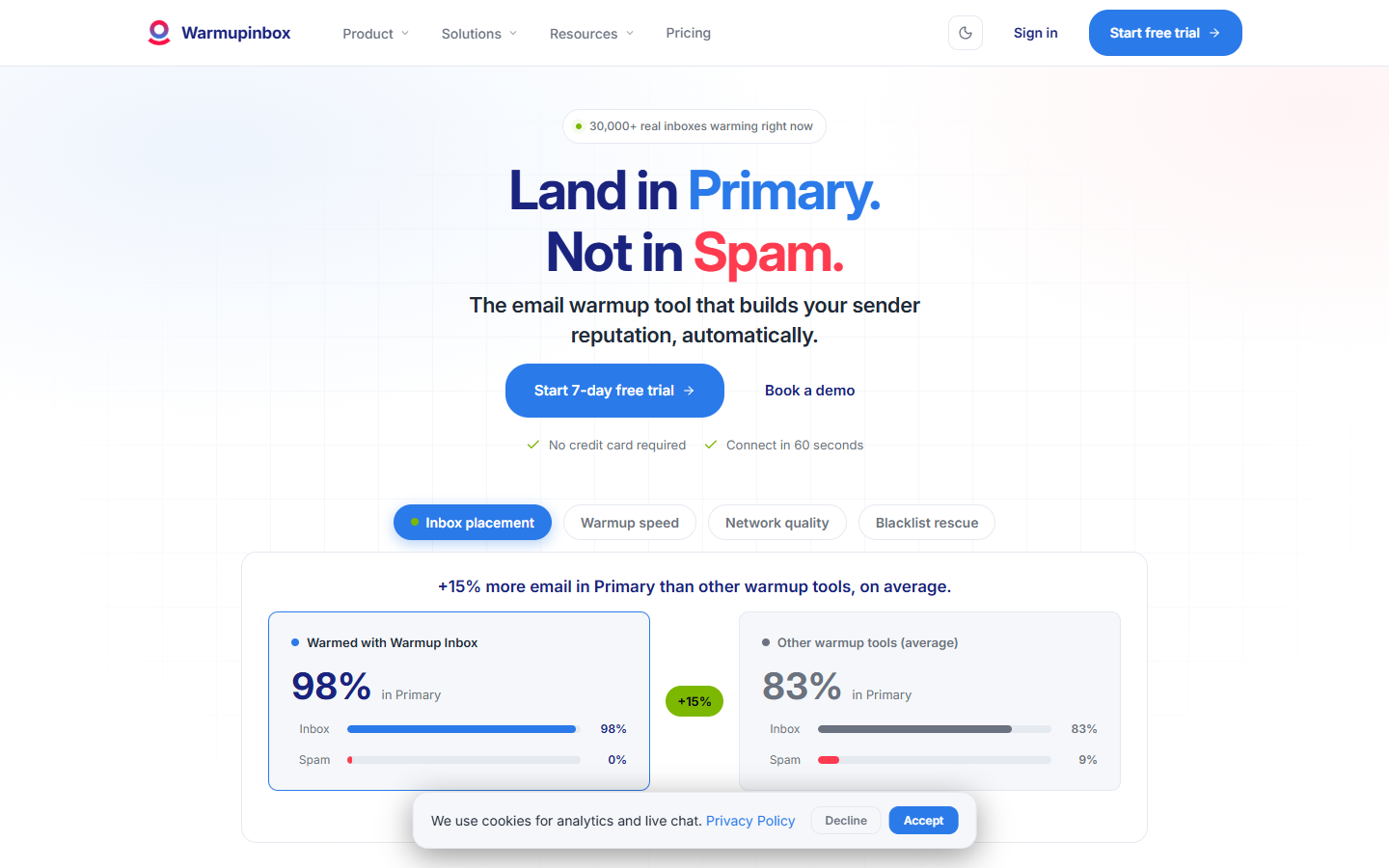
In plain English: WarmupInbox plugs you into a peer network of 30,000+ real mailboxes. Not fake accounts — real, actively-used inboxes. Yours automatically sends warmup messages out, and other inboxes in the network reply to you, mark you "important," and pull you out of spam. Feed those positive signals to Gmail and Outlook consistently, and they slowly conclude "this account is a real person." That's how the reputation climbs.
A few technical details worth knowing:
- Real interaction, not synthetic. Per the official docs, the network is made of genuinely active accounts — not recycled dead inboxes. That distinction matters: fake-account interaction gets flagged by ESPs as manipulation.
- AI-written natural conversation. Warmup content is written dynamically by AI, so you're not blasting the same template repeatedly (a classic spam trigger). It's "AI with human oversight," not fully hands-off.
- Broad provider support. Gmail/Google Workspace, Outlook/Office 365, SMTP/IMAP, Amazon SES, SendGrid — all supported.
- ESP targeting (Pro/Max). You can aim warmup specifically at Gmail, Outlook, or Yahoo. If 95% of your prospects live in Gmail, this feature genuinely earns its keep.
- It won't do the basics for you. It builds sending reputation — it will not set up your DNS authentication (SPF/DKIM/DMARC), write your copy, or find your audience. Those foundations are still on you.
The consensus among cold-email veterans: automated warmup is useful, but it isn't magic. Gmail's inbox placement rate has slid from roughly 77% to about 50% over the last couple of years, and the climate keeps getting stricter. Warmup is an amplifier, not a free pass.
Where it fits in the cold-email stack (a note on this series)
Let's be direct: WarmupInbox does exactly one job — build and maintain sending reputation. It cannot send automated cold-email sequences, and it won't find prospects for you. Treating it as a sending bot is the #1 rookie mistake.
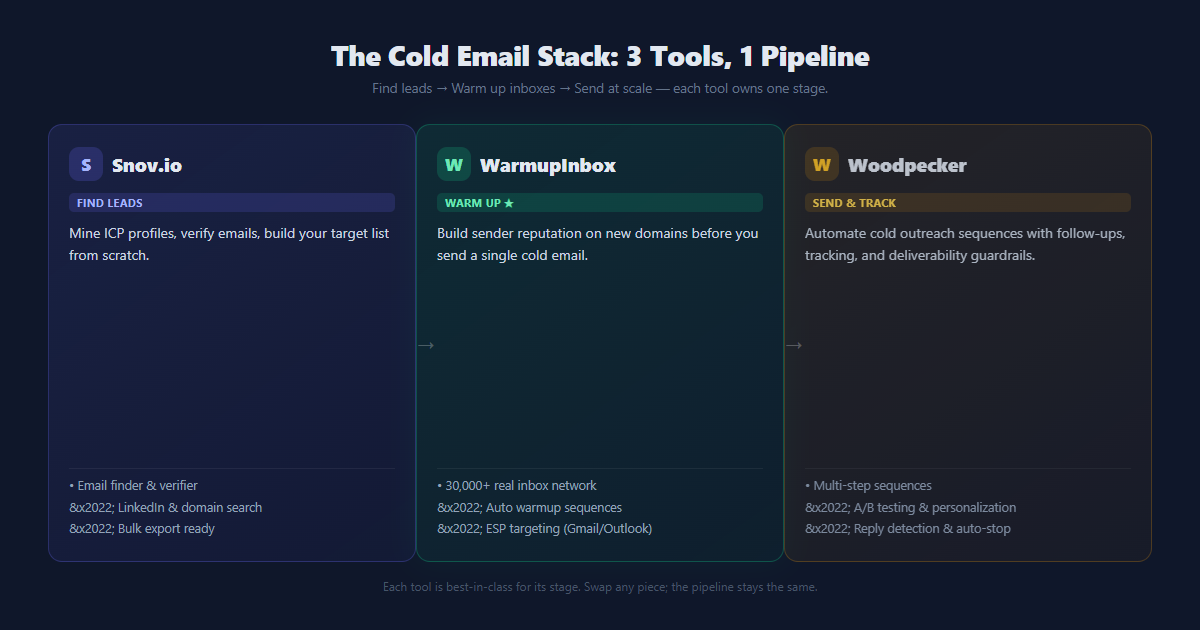
A full cold-outreach pipeline has three stages, and WarmupInbox is only the middle layer — the foundation:
| Stage | What it does | Tool in this series |
|---|---|---|
| Find leads (acquisition) | Find ICPs, collect prospect emails | Snov.io |
| Warm up (infrastructure) | Warm new mailboxes, protect reputation | WarmupInbox (this review) |
| Send (execution) | Automated sequences, reply tracking | Woodpecker |
Here's how to think about the trio:
- Just need warmup? → WarmupInbox (this review) is enough.
- Running large-scale automated outreach? → Pair it with a proper sending tool like Woodpecker — conditional follow-ups, paced sending, and strong deliverability control.
- No idea who to email? → Start with a lead-finding tool like Snov.io to dig up target accounts.
We'll break down Snov.io and Woodpecker in their own reviews later in this series. This one locks down the warmup layer.
Feature by feature, including the real pitfalls
1. Pricing and the entry barrier
Pricing is per mailbox — get that straight first. Warm five mailboxes, you pay five times the per-inbox rate.
| Plan | Annual (/inbox/mo) | Monthly (/inbox/mo) | Daily warmup cap | Max reply rate |
|---|---|---|---|---|
| Basic | $15 ($180/yr) | ~$19 | 75 | 25% |
| Pro | $49 ($588/yr) | ~$59 | 250 | 45% |
| Max | $79 ($948/yr) | ~$99 | 1,000 | 50% |
Annual billing saves 20%. Every plan includes the 7-day free trial with no credit card. 15+ mailboxes moves to volume pricing.
The real pitfall (scale cost): an agency warming 20 mailboxes on Pro pays roughly $980/month — creeping into the priciest territory in the tool's own lineup. If your goal is "warm a bunch of mailboxes," per-inbox pricing will punish you. Tools like MailReach charge regardless of mailbox count, which wins outright at scale.
2. Setup speed and ease of use
Nearly zero complaints here. Trustpilot reviewers keep saying "set up in minutes" and single out support agents Lucia and Camilo for instant replies. For someone new to outbound: connect mailbox → start warmup → watch reputation. Three steps, essentially no learning curve.
The real pitfall (SMTP/IMAP errors): non-technical users stumble when connecting custom SMTP — unclear error codes, occasionally slow support. G2 reviewers have gotten stuck on IMAP errors. Google Workspace and Microsoft 365 direct connections are the smoothest; self-hosted SMTP demands patience.
3. Deliverability and monitoring
Blacklist monitoring, spam-folder/category monitoring, and reputation checks are all there. Pro/Max add ESP targeting, language-based warmup (12 languages), custom templates, and scheduled warmup.
The real pitfall (no health score + no ongoing DNS monitoring): this is the most-cited shortcoming across reviews. WarmupInbox gives you no clear "sender reputation score," and it doesn't continuously watch SPF/DKIM drift while you warm. One G2 reviewer put it plainly: "I wish there was a domain health check." If you need deep diagnostics, MailReach's Spam Test is the stronger pick.
4. The aggressive default pace (the big one)
This deserves its own section. Multiple Trustpilot, G2, and Reddit users report: warming a new domain with the recommended default settings got their Google Workspace or Outlook account suspended — some permanently.
The pattern is consistent: new domain (<3–6 months) → the tool's recommended default volume → ESP flags it as anomalous → account locked. One Reddit user's safe alternative: "start at 10 emails a day and slowly ramp to 30 over a few weeks" — far more conservative than the defaults.
Our advice: if you're warming a new domain, dial the starting volume well below the defaults and ramp slowly. Saving $14/month isn't worth gambling your mailbox. Established domains are largely fine on the defaults.
Newbie anti-ban: recommended safe parameters
That wasn't fear-mongering. Here are the community-vetted settings — from people who've actually been burned — laid out so you can copy them directly:
| Mailbox type | Recommended daily sends | Reply rate setting |
|---|---|---|
| New domain · Week 1 | 5–10 | 20% |
| New domain · Weeks 2–3 | ~20 | 25–30% |
| New domain · Week 4+ | ~35 | 30–40% |
| Established domain | Defaults are fine (Basic caps at 75/day) | Plan defaults, 25–50% |
Note: these are community safety practices, not official parameters. The one rule that matters: new domains ramp slowly over weeks; established domains can run the defaults.
How it stacks up against the competition
The cold-email world splits into two camps: pure warmup / deliverability tools vs all-in-one outreach platforms (warmup included).
| Dimension | WarmupInbox | MailReach | Instantly.ai |
|---|---|---|---|
| Positioning | Pure warmup engine | Pure warmup + strong diagnostics | All-in-one sending platform (warmup built in) |
| Starting price | $15/inbox/mo | ~$19–25/inbox/mo | Plan-based, unlimited mailboxes |
| Biggest strength | Lowest entry + real network | Strong Spam Test, unlimited mailboxes | Large-scale outreach, workflows |
| Biggest weakness | No health score, no DNS monitoring | Pricier | Complex, pricey, steep learning curve |
Bottom line: WarmupInbox isn't the most feature-complete tool, and it isn't the deepest at diagnostics. It's the best budget-first, lightweight, decoupled option. Sending with Instantly or Smartlead, or through your own SMTP? You can hang WarmupInbox on top as an independent warmup engine and neither one interferes with the other. For deep diagnostics — or for warming a whole fleet of mailboxes — look at MailReach.
Which plan (or tool) fits you?
Transparency and data sources
We based this review on WarmupInbox's official pricing and feature pages, Trustpilot (172+ reviews, 4.6/5), G2 (4.7/5), and public user feedback aggregated by third-party reviews (mailreach.co, emailwarmup.com, warmforge.ai), verified in August 2026. Prices reflect the official pricing page at verification time — the site runs promos, so annual standard rates can shift; monthly anchors are included so you always see both sides. Full honesty: we did not run a 30-day warmup ourselves. Every conclusion here comes from cross-validating real user feedback against official documentation, and the disputed points (suspension risk, missing health score) are flagged as such.
Affiliate disclosure: this review contains affiliate links. If you sign up through one, we may earn a small commission that helps cover our testing costs. It doesn't change your price, and it doesn't change our verdict — every weakness above comes from real users, untouched.
Pricing and features verified August 2026. Source: warmupinbox.com/pricing.
P.S. WarmupInbox handles only one link of the cold-email chain — the middle one. The other two reviews in this series, Snov.io (finding the leads) and Woodpecker (sending the sequences), are both live now.
Pros & Cons
Pros
- Lowest entry price in the category: $15/inbox/mo (annual)
- 30,000+ real inbox network — real interactions, not synthetic accounts
- 7-day free trial, no credit card, cancel anytime
- 10-minute setup; support agents Lucia & Camilo repeatedly praised
Cons
- Aggressive defaults can get new-domain accounts (<6 months) suspended
- No sender-reputation health score, no ongoing DNS/SPF/DKIM monitoring
- Per-inbox billing gets pricey at scale (10+ mailboxes)
Decision Guide
Which Plan (or Tool) Fits You?
Pick your situation — we'll match the right tier or tell you which tool actually fits.
Some links on this page are affiliate links. Read our disclosure.
Annie Cole
Lead Reviewer & Software EditorAnnie Cole leads Toolisme's Software category. With a background in content marketing and journalism, she built the scoring rubric used across all reviews and has hands-on tested 40+ SaaS tools. She focuses on project management, CRM, and AI writing assistants.