Snov.io Review 2026: Find leads, verify emails, warm up mailboxes, run sequences, and manage deals — all in one subscription

By Annie Cole · Lead Reviewer & Software Editor
Annie Cole leads Toolisme's Software category. With a background in content marketing and journalism, she built the scoring rubric used acro
We signed up for Snov.io's free trial and ran the core flow: the Chrome extension grabs emails straight off LinkedIn, the domain search pulls contacts in bulk, the verifier runs a seven-layer check, and the campaign builder is a visual drag-and-drop. Find → verify → warm → send fits in one subscription (from $39/mo), but the shared credit pool burns fast on lower tiers and LinkedIn automation is a $69/mo add-on.
Our Verdict
We signed up for Snov.io's free trial and ran the core flow: the Chrome extension grabs emails straight off LinkedIn, the domain search pulls contacts in bulk, the verifier runs a seven-layer check, and the campaign builder is a visual drag-and-drop. Find → verify → warm → send fits in one subscription (from $39/mo), but the shared credit pool burns fast on lower tiers and LinkedIn automation is a $69/mo add-on.
Who It's For
Budget-conscious solo sellers and small B2B teams who want one tool to run "find → verify → warm → send → track" without stitching tools together
Who Should Skip
High-volume agencies burning 50,000+ credits a month (need Ultra or custom), or teams that require phone data and credit rollover
Snov.io Review: One Subscription That Replaces the Cold-Email Starter Stack
The most expensive part of cold email is assembling the stack, not sending
Every cold-email setup starts the same way: Hunter to find emails, WarmupInbox to protect your domain, Woodpecker to run sequences. Sounds professional — until you add it up. Three subscriptions, easily $135+ a month. Data exported and imported between three backends. One wrong DNS step and you've lost an evening.
We've watched too many people die at the "I configured the stack but haven't sent a single decent sequence" stage.
Snov.io does something more direct: it puts lead finding, email verification, warm-up, automated sequences, and customer management into one dashboard. This review breaks down whether it actually saves you those two extra subscriptions — and where the traps are.
See the extension in action — searching LinkedIn, previewing emails with verification status, and saving the batch:
TL;DR — The verdict in one sentence
Snov.io is the best-value all-in-one for cold-email acquisition right now: from $39/month (annual billing), you get prospecting + verification + warm-up + sequences + a free CRM — most of the starter-stack bill, gone. It's built for budget-conscious B2B teams and solo sellers who don't want to babysit three tools. But it has a credit-system temperament — heavy users need to plan their upgrade path.
| Spec | Value |
|---|---|
| Free tier | $0 — 50 credits/mo, 100 recipients, no credit card |
| Starting price | Starter $39/mo ($29.25/mo annual) |
| Sweet spot | Pro S $99/mo ($74.25/mo annual, unlimited warm-up) |
| Top tier | Ultra $738/mo (100,000 credits/mo) |
| Ratings | G2 4.6/5 (359 reviews), Capterra 4.5/5 (215 reviews) |
| Recipient billing | 1 credit per first contact, follow-ups free in the same period |
Best for budget-conscious B2B teams and solo sellers. Skip it if you're a high-volume agency (50,000+ credits/month) or need phone data and credit rollover.
Free plan includes 50 credits — sign-up takes ~30 seconds, no credit card required
What we actually ran (hands-on)
We signed up for the free trial — no credit card, straight into the dashboard. Installed the Chrome extension, searched "UI/UX Designer" on LinkedIn, and the popup listed six contacts with emails, titles, and verification dots. Selected all, hit Save selected, done. We also ran a domain search, pushed a small list through the Email Verifier, and pulled up a Drip Campaign canvas to feel out the drag-and-drop builder. The 50 credits were gone after grabbing a dozen or so contacts with emails and verifying one small batch.
Three things stood out:
- The free quota burns faster than it looks. We expected 50 credits to last a while. A serious session of grabbing a dozen contacts with emails plus one verification batch nearly emptied the pool. Snov.io itself frames the free tier as a taste, not a plan.
- "Save without emails" is a free switch most people miss. If you only want LinkedIn automation, this option spends zero credits. Defaulting to save-with-email spends them on autopilot.
- The verifier flags more "Unverifiable" than you'd expect. Catch-all domains in particular land yellow often. Snov.io's own guidance is to keep yellow under 5% before sending — in practice, some addresses that look fine come back yellow, and you decide whether to risk them.
What it actually is: an all-in-one cold-email platform
One sentence: one system runs the entire "find → verify → warm → send → CRM follow-up" pipeline. The audience is foreign-trade sellers, B2B exporters, growth teams, and sales agencies.
Four blocks under one roof:
- Email Finder — a Chrome extension that scrapes contacts and their emails directly from LinkedIn / Sales Navigator pages; you can also bulk-mine a company website for CEOs, procurement managers, and other decision-makers.
- Email Verifier — built in, filters dead or abandoned addresses in real time to cut bounces and protect your domain.
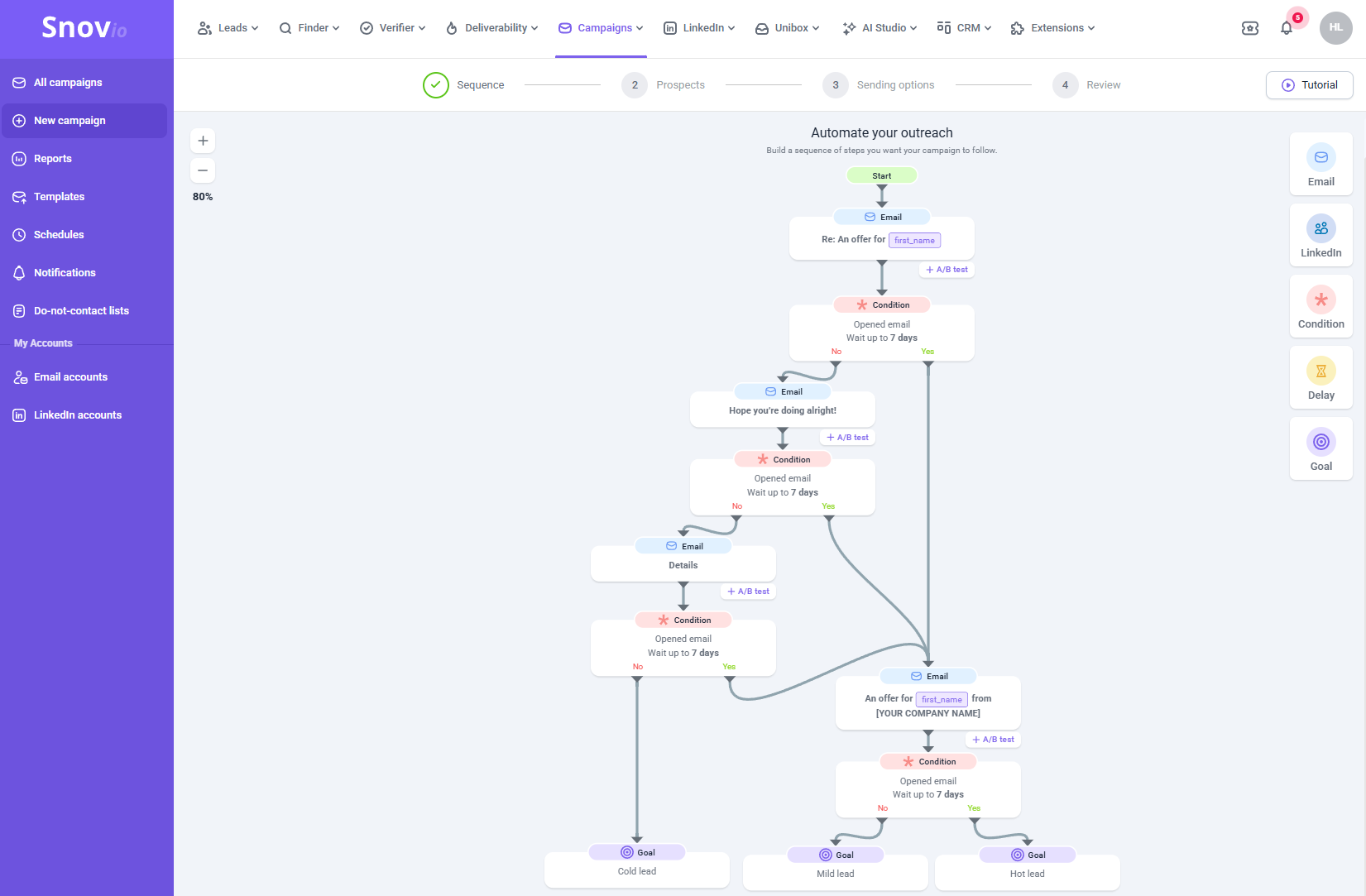
- Drip Campaigns — multi-branch logic ("no open after 3 days → send A; opened but no reply → send B"), AI-assisted writing, and LinkedIn automation on top.
- Free CRM — replies from interested prospects flow straight into a visual pipeline, killing the need for HubSpot or Pipedrive.
Here's what the campaign builder actually looks like — Email, Delay, Condition, LinkedIn action, and Goal elements dragged onto a canvas and connected with dashed lines:
Why it's both safe and fast
- Waterfall verification. Real-time SMTP handshake + database comparison, two passes on every address. Higher deliverability, fewer bounces — that's the core of its data quality.
- Peer-to-peer warm-up network. Real accounts and AI-written content exchange messages to build sender reputation. Same principle as standalone warm-up tools, but bundled into the subscription — which is exactly why it undercuts "Hunter + a separate warm-up tool" on cost.
- Dynamic send control. Simulated working hours, randomized send intervals, custom tracking domains — engineered to slip past spam filters.
- MCP access (the 2026 flex). You can now plug AI assistants like Claude or ChatGPT into your Snov.io account over MCP and work inside the tool. A genuine delight if you live in an AI workflow.
Honest note: an all-in-one rarely beats a specialist at any single job. Snov.io's warm-up isn't as deep as WarmupInbox's 30,000+ real-inbox network, and its sequences aren't as granular as Woodpecker's conditional logic. Its win is the whole pipeline at one price — you're buying "good enough and simple," not "best-in-class per feature."
Feature by feature, including the real pitfalls
1. Finding and verifying (its strongest game)
LinkedIn extension scraping + bulk domain mining + built-in verification — a genuinely handy combo for B2B. One account manager at Okisam reported collecting 80,000+ leads in a month and driving down cost per lead.
The real pitfall (data freshness): third-party reviews repeatedly flag outdated entries — people who've left companies still sitting in the database. Always run the verifier over a batch before importing it wholesale.
2. Sequences and follow-up (good, not great)
Multi-branch logic, AI writing, unlimited follow-ups — all present. Open-rate wins are common (Populus Sales' CEO reported a jump from 25% to 73%).
The omnichannel play: email sequences and LinkedIn automation can run in parallel — no reply on email, follow up with a LinkedIn connection request or DM. One lead, two touches. That's the line between a "sending tool" and a real acquisition platform, and it's where Snov.io separates from pure email tools.
The real pitfall (LinkedIn costs extra): LinkedIn automation is not included — it's a $69/mo per-slot add-on. If you're planning a LinkedIn DM matrix, budget for it. If you need LinkedIn automation on more than one slot, the math starts favoring Pro S ($99/mo, unlimited warm-up + full feature set) over stacking add-ons on Starter — compare both before you commit.
3. The free CRM (a pleasant surprise)
Up to 20 pipelines with 100 stages each, synced with Google Calendar. As a freebie it's genuinely usable; don't expect HubSpot depth. Its real value is native integration — sequence replies land on the board without manual copying.
4. The credit system (its biggest temperament)
1 credit = 1 prospect search or 1 email verification. Search and verification draw from the same pool — lower tiers burn through it fast, and unused credits don't roll over (Custom Ultra excepted). It's the most-cited complaint, and it's fair: align your budget with your volume, or you'll hit the wall mid-month.
Credit-saving tip: dedupe before bulk-grabbing — don't search the same domain or contact twice — and verify in one batch afterward instead of as you go. These two habits noticeably cut repeat charges, and they matter most on the cheap tiers. It's the most-mentioned money-saver in real user feedback.
Pricing: does it actually save you money?
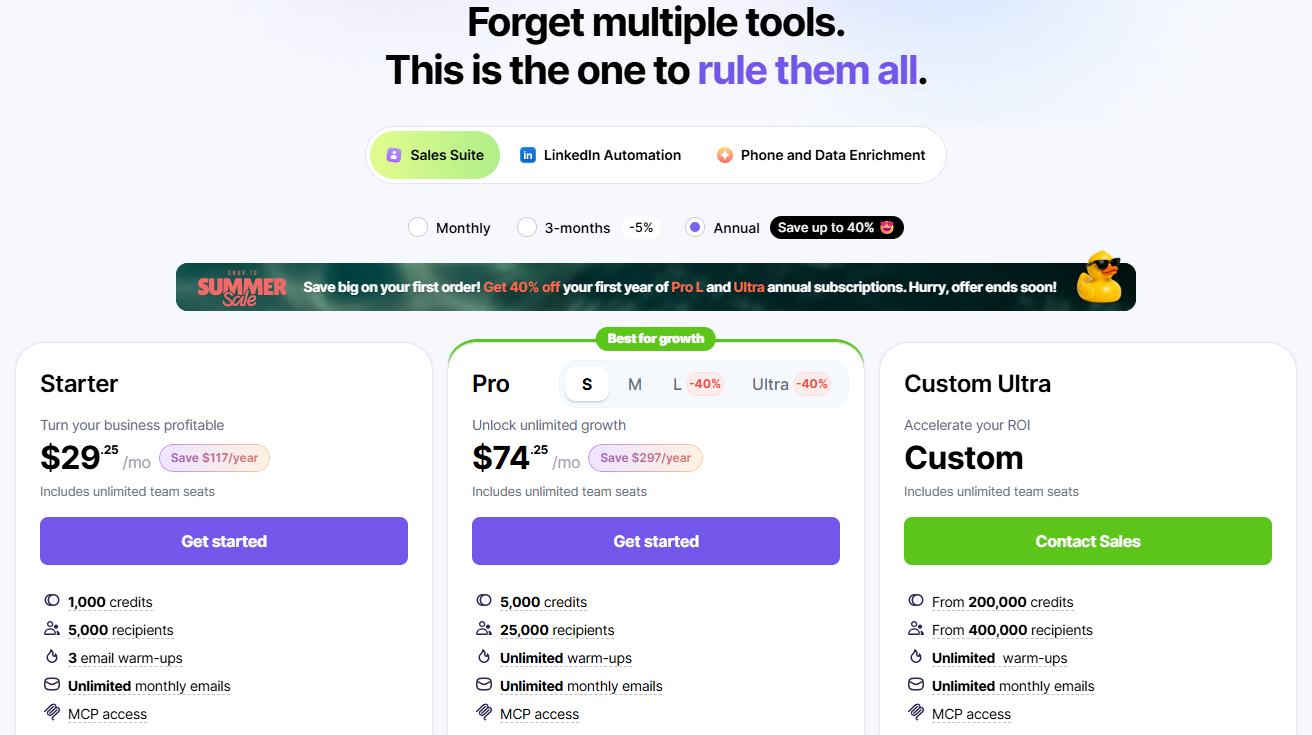
| Plan | Monthly | Annual (/mo) | Credits/mo | Recipients/mo | Warm-up slots |
|---|---|---|---|---|---|
| Trial (free) | $0 | — | 50 | 100 | 1 |
| Starter | $39 | $29.25 | 1,000 | 5,000 | 3 |
| Pro S | $99 | $74.25 | 5,000 | 25,000 | Unlimited |
| Pro M | $189 | $141.75 | 20,000 | 50,000 | Unlimited |
| Pro L | $369 | $276 | 50,000 | 100,000 | Unlimited |
| Ultra | $738 | $553.50 | 100,000 | 200,000 | Unlimited |
Annual billing saves 25% flat. Every paid plan includes unlimited team seats, campaigns, follow-ups, and monthly sends. Recipients are charged on first contact; follow-ups in the same billing period are free. Key catch: Starter includes only 3 warm-up slots — wanting more mailboxes warmed means stepping up to Pro S, so factor that upgrade into your budget. Running more than 3 mailboxes? Go straight to Pro S ($99/mo) — unlimited warm-up slots plus A/B testing, Spintax, and API access make it the better long-term buy than Starter + add-ons.
Do the math (stack prices verified August 2026):
| Setup | Monthly cost | What it covers |
|---|---|---|
| Traditional stack | Hunter $49 + WarmupInbox 3 mailboxes $57 + Woodpecker $29 ≈ $135+ | Find / warm / send — three subscriptions, three backends |
| Snov.io Starter | $39 | Finding + verification + 3 warm-up slots + unlimited sends + free CRM |
Same cold-email pipeline, $135+ vs $39. Snov.io covers every stage for the price of one subscription — that's the conversion point. At high volume, Pro S ($99/mo) still beats the stack one-to-three.
Why it beats Hunter.io on cost
We compared it head-to-head against the most classic alternative, Hunter.io (prices verified August 2026):
| Dimension | Snov.io | Hunter.io | Winner |
|---|---|---|---|
| Feature completeness | Find + verify + warm + sequence + CRM + LinkedIn | Focused on find + verify; warm-up is a paid add-on | Snov.io |
| LinkedIn scraping | Native Chrome extension | No longer supports bulk scraping | Snov.io |
| Same-tier entry price | Starter $39/mo, 3 warm-up slots included | Starter $49/mo, warm-up purchased separately | Snov.io |
| Built-in CRM | Free on all plans | No native CRM | Snov.io |
| Data accuracy | Balanced across EU/US + Asia | Deeper in EU/US enterprise domains | Tie |
Bottom line: if all you need is "find emails and send sequences," Hunter's focus is fine. But the moment you touch cold email, warm-up becomes non-negotiable — and Hunter sells it as an add-on, while Snov.io bundles it. On budget alone, that's decisive.
Where it sits in the cold-email stack (this series)
We're running a cold-email series with a three-piece logic:
| Stage | What it does | Tool in this series |
|---|---|---|
| Find leads (acquisition) | Find ICPs, collect prospect emails | Snov.io (this review) |
| Warm up (infrastructure) | Warm new mailboxes, protect reputation | WarmupInbox |
| Send (execution) | Automated sequences, reply tracking | Woodpecker |
But Snov.io has a twist: it can do the other two stages itself (warm-up and sequences are built in). So it has two legitimate uses:
- Budget only stretches to one tool → run the whole pipeline on Snov.io; skip the stack.
- Your sending setup is already locked in (say, your team runs Woodpecker) → Snov.io works perfectly as the "find + verify + CRM" layer, decoupled and non-interfering.
For how to pick the other two links in the chain (pure warm-up vs pro sending), see our WarmupInbox review and Woodpecker review — both live now.
🚀 Claim your 50 free credits →
50 free credits on sign-up — no credit card, ~30 seconds to register
The final decision tree
- New to cold email, want one tool end-to-end → Snov.io Starter ($39/mo). Burn the free 50 credits first; upgrade once you're comfortable.
- Solo seller / small team, under 5,000 recipients a month → Starter is enough; just don't waste credits on verification.
- Serious team (10+ mailboxes, multilingual) → Pro S ($99/mo): unlimited warm-up slots plus the full feature set (A/B testing, Spintax, API).
- High-volume agency (50,000+ credits a month) → Look at Ultra or custom, and check the credit-rollover terms.
- Only need find + send, no warm-up → Hunter's specialist route works — but remember warm-up eventually becomes unavoidable.
Transparency and data sources
Hands-on: we registered for the free trial (Trial tier, 50 credits), installed the Chrome extension, grabbed contacts with emails off a LinkedIn search, ran a batch through the Email Verifier, and opened the Drip Campaign canvas (August 2026). We ran the core flow on the free trial — we did not run a full pipeline.
Research: pricing and features are based on Snov.io's official pricing page (snov.io/pricing) and product docs, cross-checked against independent reviews (frontdeskreview — captured June 2026 — work-management.org, lagrowthmachine, saleshandy), verified in August 2026. Ratings are from G2 (4.6/5, 359 reviews) and Capterra (4.5/5, 215 reviews). Prices track the official page at verification time — they adjust, and the 25% annual discount is the current sticker. The disputed points (credit system, LinkedIn add-on pricing, data freshness) are flagged as such, straight from real user feedback.
Affiliate disclosure: this review contains affiliate links. If you sign up through one, we may earn a small commission that helps cover testing costs. It doesn't change your price, and it doesn't change our verdict — every weakness above comes from real users, untouched. Affiliate links: see our disclosure.
Pricing and features verified August 2026. Source: snov.io/pricing.
P.S. Snov.io is the "who do I email?" link of the cold-email chain. The other two reviews in this series — WarmupInbox (warming the mailbox) and Woodpecker (sending the sequences) — are both live now.
Pros & Cons
Pros
- True all-in-one: lead finding, verification, warm-up, sequences, and a free CRM in one subscription
- Free trial with zero friction: 50 credits/mo, 100 recipients, 1 warm-up slot, no credit card
- Warm-up bundled in: Starter ships with 3 warm-up slots (Hunter sells this as a paid plugin)
- Free native CRM: 20 pipelines / 100 stages / Google Calendar sync, replies land on the board automatically
Cons
- Search and verification share one credit pool — lower tiers burn through it fast, unused credits don't roll over
- LinkedIn automation is not included — a $69/mo per-slot add-on
- Starter only includes 3 warm-up slots; more requires stepping up to Pro S ($99/mo)
- Feature-dense UI has a learning curve; some settings take a few clicks to find
30-second picker
Which Snov.io plan fits you?
Pick your cold-email stage — we’ll match the right tier and show the current price.
Some links on this page are affiliate links. Read our disclosure.
Annie Cole
Lead Reviewer & Software EditorAnnie Cole leads Toolisme's Software category. With a background in content marketing and journalism, she built the scoring rubric used across all reviews and has hands-on tested 40+ SaaS tools. She focuses on project management, CRM, and AI writing assistants.