Joiin Review 2026: Cut your multi-entity month-end from three weeks to a few hours — for less than half what the alternatives charge.

By Annie Cole · Lead Reviewer & Software Editor
Annie Cole leads Toolisme's Software category. With a background in content marketing and journalism, she built the scoring rubric used acro
Joiin is a multi-entity financial consolidation and reporting SaaS that connects Xero, QuickBooks, Sage, MYOB and spreadsheets, then handles chart-of-accounts mapping, intercompany eliminations and multi-currency translation automatically. Every plan includes unlimited users and unlimited reports, billed per company, with a 14-day full-feature trial that doesn't need a credit card.
Our Verdict
Joiin is a multi-entity financial consolidation and reporting SaaS that connects Xero, QuickBooks, Sage, MYOB and spreadsheets, then handles chart-of-accounts mapping, intercompany eliminations and multi-currency translation automatically. Every plan includes unlimited users and unlimited reports, billed per company, with a 14-day full-feature trial that doesn't need a credit card.
Who It's For
Group finance teams and accounting practices managing 2+ entities on Xero, QuickBooks or Sage
Who Should Skip
Single-entity small businesses that don't consolidate, plus large enterprises running on legacy on-prem ERPs
How long should it take to consolidate five companies every month? Joiin's answer: from three weeks to a few hours.
The clearest signal comes from the people who already switched. Across G2 and Capterra, the reviews for Joiin share almost the same opener: "we used to do this in Excel." One Capterra reviewer, a Canadian software CEO, described the old process — spreadsheets plus custom macros, with multi-currency conversion as the hardest part. The accounting team burned extra hours every month on management reporting, a cycle that added up to roughly three weeks of person-effort. After moving to Joiin, the same team cut the full consolidation-and-reporting cycle to a few hours.
That pattern repeats across the review base: an Xero App Store reviewer manages 88 business units and produces board reports "at the click of a button"; a G2 reviewer in financial services consolidates two companies and saves "about a day per month." The recurring theme isn't features — it's time reclaimed from a spreadsheet workflow that had calcified.
The reason is structural. Xero and QuickBooks won't build group consolidation for you. Their underlying model is a single entity ledger: open five Xero organisations and they're treated as five unrelated businesses. The five-step job that produces one consolidated group report — aligning chart of accounts, eliminating intercompany transactions, translating AUD and GBP into one reporting currency — is not a native feature. So finance teams keep falling back to that 40-tab workbook.
Signing up was faster than we expected
Signing up took about three minutes: two questions — company name and work email — and no credit card. The 14-day trial unlocks the full feature set, including AI, API and Report Packs. That's a noticeably low-friction start compared to most consolidation tools, which usually demand a card or force you to pick a tier at the gate.
The next step is connecting data sources. Joiin lists a long lineup of accounting and operational systems — Xero, QuickBooks, Sage, MYOB, Pennylane, Puzzle, FreeAgent, Zoho Books, plus Stripe for operational data. On the output side there's a Microsoft-certified Excel add-in, Zapier, the Joiin Connect API, and an MCP server. The menu is generous. Whether it wires up cleanly with a messy real-world chart of accounts is the part reviews disagree on — and it's covered in the failure-modes section below.
TL;DR — three minutes to decide whether Joiin is worth a trial
| Dimension | Verdict |
|---|---|
| What it is | Multi-entity financial consolidation + reporting SaaS. Connects to Xero / QuickBooks / Sage / MYOB / Puzzle / FreeAgent / Pennylane / Zoho Books / spreadsheets. |
| Monthly price (1 company, USD) | Core $35 / Pro $42 / Max $49 (captured 2026-09-06 from joiin.co/pricing) |
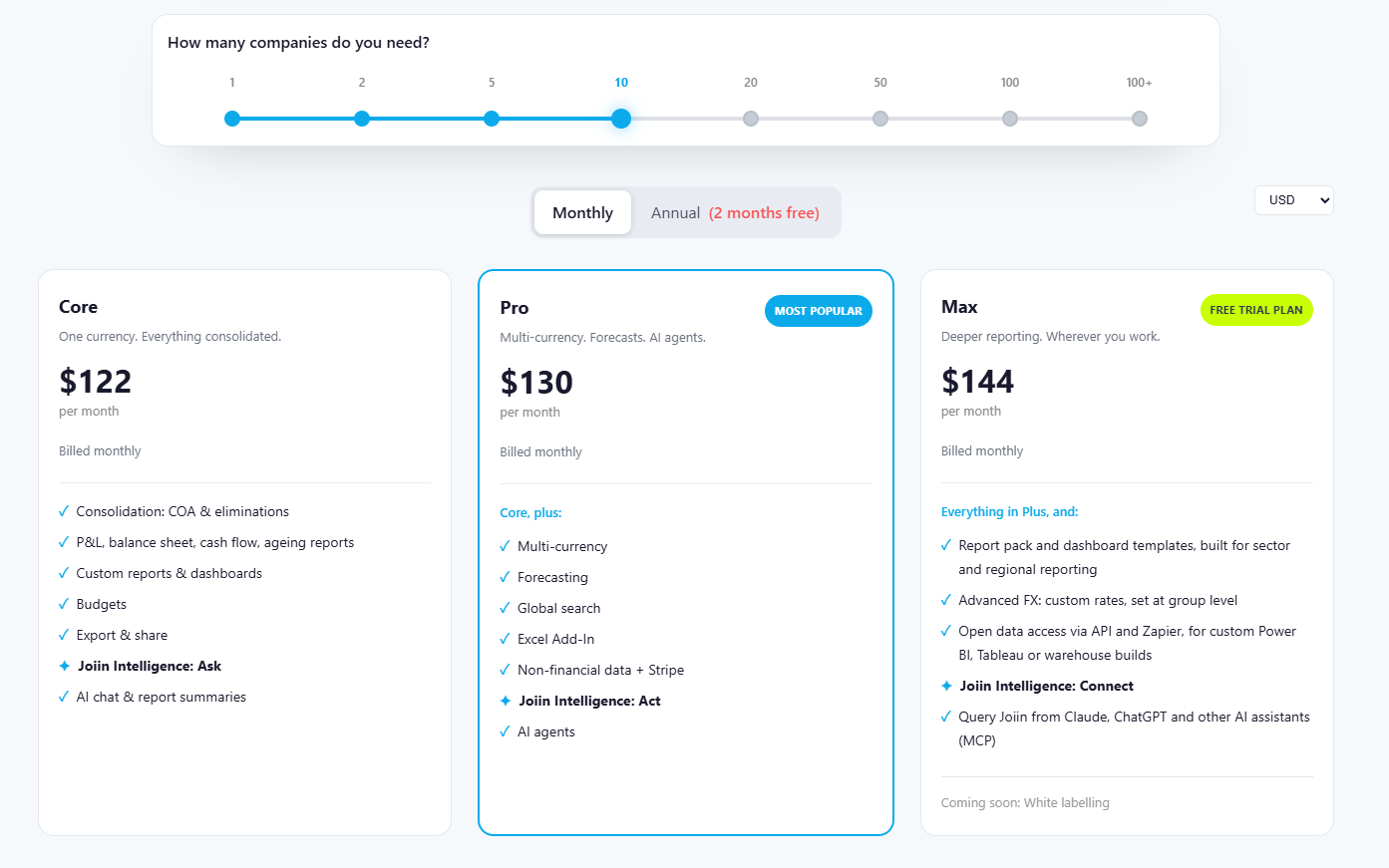
| Per-company scale (monthly, USD) | 1 company $35 · 5 companies $77 · 10 companies $122 · 20 companies $183 · 50 companies $224 · 100 companies $350 |
| Trial | 14 days, full access, no credit card. AI, API and Report Packs all included during trial. |
| Users and reports | Unlimited users, unlimited reports on every tier. No per-seat billing. |
| Third-party ratings | G2 4.7/5 (78 reviews) · Capterra UK 4.8/5 · Xero App Store 4.92/5 (461 reviews), collected Sep 2026 |
| One-line conclusion | If you run two or more companies on cloud accounting software and you're still consolidating manually, this is the best price-per-entity option we found. |
Pros
- Billed per company, not per seat. Your team can grow from 3 to 30 people with no bill change.
- Flexible chart-of-accounts mapping. Each subsidiary can have different account names and still align to the group view.
- Multi-currency with custom rates. Max tier supports historical-rate equity translation (the IFRS requirement).
- Microsoft-certified Excel add-in. You don't have to abandon a working spreadsheet model.
- API + Zapier + MCP server. Data flows into Power BI, Tableau, even Claude.
Cons
- Chart-of-accounts changes can quietly break existing reports. No change-warning prompt yet (per G2 feedback).
- Source data auto-syncs every 24 hours per the official FAQ. Manual refresh is available, but it's not minute-by-minute.
- Standard P&L and balance-sheet templates are generic. Most teams rebuild via the custom report builder (per Capterra reviews).
- No permanent free tier — only the 14-day trial. And per-company pricing scales linearly as you grow.
Best for: group finance teams running 2+ entities on Xero / QuickBooks / Sage; accounting practices and advisors handling multi-client consolidation with branded Report Packs.
Not for: single-entity small businesses where native Xero reporting is sufficient; or large enterprises on legacy on-prem ERPs that need heavily customised consolidation logic.
Start your 14-day trial (no credit card) →
Why this company is worth trusting
Joiin was founded in 2018, headquartered in Exeter, with Lucien Wynn as CEO and co-founder. By 2026, the homepage claims "65,000 organisations on the platform" across 100+ countries. We can't independently verify that number — it's vendor self-reported — but the third-party signals stack up:
- G2 Summer 2026: 5 Leader badges (Financial Analysis, Financial Close, Budgeting & Forecasting, etc.), 49 badges total, 3 #1 rankings. Winter 2026: 55 badges.
- Xero App Store: 4.92/5 across 461 reviews. Listed since December 2018.
- Intuit Platinum Partner (Feb 2026); Xero Global App Awards 2025 — Canada Small Business App of the Year.
- B Corp certified (per Capterra vendor profile).
For finance software these badges aren't the headline. The headline is that G2 put Joiin into the Leader grid for FP&A — and that grid weighs customer satisfaction multiplied by market presence, not paid placement.
How it actually merges five ledgers into one report
The hard part of consolidation isn't addition — it's alignment. Joiin's pipeline looks like this:
- Pull: native APIs pull balances and transactions from Xero / QuickBooks / Sage / MYOB. Automatic daily sync, plus on-demand manual refresh.
- Chart-of-accounts mapping: subsidiaries with different account names ("Office expenses" vs "Admin – office") get mapped onto a unified group-level chart. This is the foundation — and the biggest failure point, see the failure-modes section.
- Currency translation: each entity converts into the group reporting currency at automatic rates. Max tier allows custom rates and group-level rate settings — historical-rate equity translation for IFRS becomes solvable.
- Intercompany eliminations: automatically cancels intra-group sales, loans and balances so revenue isn't double-counted.
- Consolidation journals: manual adjustment entries for edge cases the automation can't cover.
- Output: P&L, balance sheet, cash flow, ageing reports, KPIs — or packaged as branded Report Packs (board pack / management pack), exportable to Excel / PDF.
Security & compliance — straight talk
The official security page is concrete: hosted on AWS, full SSL, 2FA via SMS one-time code, financial data stored in AWS high-security zones, deletion of a company also deletes the corresponding QuickBooks / Sage / Xero API access tokens, credit-card data handled by Stripe (not Joiin). The page also states that Xero, Sage and QuickBooks perform regular third-party security audits.
But — important — as of September 2026, the public pages do not list SOC 2 Type II or ISO 27001 certifications. If your procurement process requires either of those, ask Joiin directly for the compliance documentation; don't assume it exists.

Where the money goes — and where it saves
1. Consolidation: where Joiin pays for itself
Unlimited entities (FAQ says 2 to unlimited). Automatic eliminations. Multi-currency. The reviews back the value up: the G2 reviewer managing two companies saves "about a day per month" on Xero consolidation, and the Xero App Store reviewer running 88 business units produces board reports "at the click of a button."
2. Report Packs: turning "output a report" into "output a deliverable"
This is where Joiin differentiates from pure calculation tools — it bundles the consolidated numbers, dashboard and written commentary into reusable board packs and management packs, presentable live or exportable as PDF / Excel. For accounting practices, almost all the value sits right here. The screenshot above shows the Report Packs cover editor: drag-and-drop layout, theme picker, brand colour palette, rich-text controls. This is the layer where Joiin and the Excel-only workflow actually part ways.
3. Joiin Intelligence (AI): tiered, not bundled
- Ask (Core and up): AI chat and report summaries
- Act (Pro and up): AI agents
- Connect (Max): via MCP server, Claude / ChatGPT / Cursor can query your live consolidated data
Splitting AI by tier rather than bundling it is unusual. The upside: you can test whether the AI is genuinely useful on the cheapest plan, instead of upgrading to evaluate.
4. Integrations: data flows out, not just in
Worth calling out: Microsoft-certified Excel add-in, Joiin Connect API, Zapier (Bronze Partner since August 2026), MCP server. Many consolidation tools assume you'll live in their UI from now on. Joiin clearly isn't trying to lock you in.
💡 The high-leverage move: don't treat Joiin as "another dashboard." Treat it as the data-pull and consolidation engine. Pull merged multi-currency numbers back into your existing spreadsheet model via the Excel add-in, then use Zapier to push a copy to Slack or Google Sheets when a report is ready. You keep your existing spreadsheet logic and outsource the part that breaks most often.
5. Failure modes — pulled from real user feedback
These are the places reviewers actually ran into trouble, so they're worth reading before you commit.
① Chart-of-accounts is fragile; one change can break things. A small-business G2 reviewer in financial services said the issue is mostly in setup — "you have to make sure everything is coded correctly in Xero first" — and "it's super sensitive to changes; you change the COA and it tends to break," after which active maintenance is required. There's no "you just added this account, do you want me to map it into your pack?" prompt yet. Joiin replied on the review that they've added this to the roadmap. This is a genuine gap: the COA is the foundation, and Joiin currently gives you no warning when a change will knock the mapping above it out of line.
② "Real-time" has limits. The integrations FAQ is plain: source data auto-refreshes every 24 hours, with manual refresh available. So "real-time dashboard" describes the reporting layer computing on demand — not minute-by-minute syncing of the underlying ledgers. If you need today's bank feed to show up in the group report instantly, you'll need to hit the manual refresh.
③ Standard templates are not enough; custom is the answer. One Capterra reviewer put it directly: "the standard P&L and balance sheet reports weren't very useful for us, fortunately the custom report builder is very easy to use for non-technical accounting users." Two other reviewers (James and Eric) also want more flexibility in report output; another noted the dashboard needs improvement.
④ FX translation can drift. A UK Capterra reviewer (Eric, more than a year on the platform) called FX the major issue: "it often doesn't tie to the balances or FX rates used in Xero and therefore produces disjointed reports." His view: Joiin shouldn't manage FX itself; it should just pull the numbers from Xero. That review is from late 2024; Joiin later added custom rates and group-level rate settings on Max — if you're a multi-currency group, verify this against your own numbers during the trial.
⑤ A ceiling on complex scenarios. Third-party reviewers (getcheetah, 2026) note that Joiin handles standard consolidation shapes well, but tracking-category-level consolidation and non-standard intercompany scenarios get strained. Highly bespoke group layouts are not its strength.
6. Head-to-head: lay the bills on the table
The Joiin and Fathom numbers below come straight from each vendor's official pricing pages (captured 2026-09-06). Syft and Spotlight figures are aggregated from third-party review sites — verify against their current pages before purchase.
| Tool | 10 companies | 25 companies | 50 companies | Pricing model | Source |
|---|---|---|---|---|---|
| Joiin | $122/mo | $183/mo (20-company tier) | $224/mo | Per company, unlimited users | Official joiin.co/pricing |
| Fathom | $315/mo (Silver, includes 10 companies) | $450/mo (Gold, includes 25) | $805/mo (Platinum, includes 50) | Per-tier + overage per company | Official fathomhq.com/pricing |
| Syft Analytics | Standard $23 / Plus $47 / Advanced $95 | Same tiers | Same tiers | Per-feature tier; separate per-entity plans exist | TechnologyAdvice 2026 (secondary) |
| Spotlight Reporting | $25–$250/mo range | Same range | Same range | Range quote | Claryx 2026 (secondary) |
How to read this: the pricing models aren't apples-to-apples — Syft and Spotlight bill by feature tier rather than entity count, so adding entities may or may not cost more (secondary sources mention a separate Syft plan at $63/entity or $399/mo for unlimited entities). But on the same 10-company comparison, Joiin $122 vs Fathom $315 is a 2.6× gap, which is large enough that you should be clear what you're paying Fathom's premium for.
What Fathom charges extra for: more mature management reporting and benchmarking, cash-flow forecasting and scenario analysis, G2 4.6/5 with "99,000 businesses" scale. If your real need is producing polished analytical reports for the board, Fathom fits. If your need is merging five ledgers into one correct number, Joiin is direct, and materially cheaper.
Decision tree: three profiles, three paths
If you run 2–10 entities on Xero / QuickBooks / Sage as a group finance team Start on Core or Pro. Single-currency → Core (1 company from $35/mo, 10 companies around $122/mo). Multi-currency, forecasting or Excel add-in needed → Pro (1 company from $42/mo). Don't pay annually until you've run one full month-end on the trial and confirmed the COA mapping holds up against your real chart.
If you're an accounting practice or advisor with multi-entity clients Look at Max (1 company from $49/mo). Multi-client switching, Report Packs, API + Zapier, MCP — these are the basics of delivering to clients. White labelling is on the "coming soon" list. In this scenario Joiin is unusually good value: you bill by client company count, but seat counts aren't capped, so everyone on your team can get into the numbers.
If you only have one company, or your consolidation logic is heavily bespoke Don't buy. Single entity? Xero's native reporting is enough. Running an on-prem ERP with custom consolidation rules? Joiin's template ceiling will push you back to Excel — look at enterprise-tier Vena, DataRails or CCH Tagetik instead.
One question you can't skip: do you need tracking-category-level consolidation? If yes, trial it with your messiest subsidiary first, not your cleanest one. A clean-data test result doesn't tell you anything.
Final verdict: 4.5 / 5 — recommended for multi-entity teams
Joiin does one thing very deliberately: it doesn't try to be a full FP&A suite; it tries to be the cheapest correct way to merge multiple ledgers. Per-company billing, unlimited users, unlimited reports — those three together hit the exact pain point of mid-size groups and accounting practices. The G2 4.7/5 (78 reviews) and Xero App Store 4.92/5 (461 reviews) reputations aren't marketing; they're the cumulative weight of time saved every month, across thousands of teams.
The 0.5 we deducted comes from two places: the missing COA-change warning mechanism, and the gap between "real-time" as marketed and "real-time" as the 24-hour sync actually delivers. Neither is fatal, but both mean you need to set your own operating rules before you go live.
Recommended tier: multi-currency / forecasting / Excel add-in needed → Pro. Practice delivering to clients → Max. Single-currency small group testing the waters → start on Core.
Who should walk away: single entities with no consolidation need; teams on legacy on-prem ERPs with heavily customised consolidation rules; and anyone expecting Joiin to deliver full FP&A analysis and scenario planning — that's Fathom and Spotlight's territory.
Transparency & sources
How this review was put together
This review combines first-hand sign-up with a broad set of third-party user feedback.
- What we did first-hand: registered a trial account and went through sign-up ourselves — three minutes, two questions, no credit card. We also captured the pricing, features, integrations and security information directly from joiin.co's own pages.
- What comes from other users: the consolidation workflow details, the strengths and the failure modes in this article are drawn from public reviews on G2, Capterra, the Xero App Store and third-party write-ups, rather than a first-hand run against our own accounting data. We've attributed each finding to its source in the text so you can judge its weight for yourself.
Specific sources:
- Pricing: captured 2026-09-06 from the official pricing page https://www.joiin.co/pricing/ with the company-count slider set to 10, Monthly billing, USD (see 03-pricing.png in this article)
- Features & integrations: homepage, /integrations/, /consolidations/, /features/end-to-end-security/ (captured 2026-09-06)
- Third-party ratings: G2 (4.7/5, 78 reviews), Capterra UK (4.8/5), Xero App Store (4.92/5, 461 reviews) — collected Sep 2026
- User-review quotes: G2 and Capterra public review pages (Geoff W, Eric, James, Faisal, AF and others), each tagged with platform and date
- Competitor pricing: Fathom official fathomhq.com/pricing (captured 2026-09-06); Syft and Spotlight figures aggregated from TechnologyAdvice and Claryx (secondary sources, not vendor-verified)
- Compliance note: SOC 2 Type II / ISO 27001 certifications not listed on public pages; request compliance documentation from Joiin before procurement if required
Pricing and features verified as of September 2026 from joiin.co. Prices change; check the live official page before purchase.
Affiliate links: see our disclosure.
FAQ
Does Joiin have a free version? No permanent free tier — only a 14-day full-feature free trial, no credit card required. During the trial, consolidation, AI, API and Report Packs are all unlocked.
How many entities can it consolidate? Per the official FAQ, 2 to unlimited. Pricing scales per company: 10 entities around $122/mo, 20 around $183/mo, 50 around $224/mo, 100 around $350/mo.
How often does the data sync? Per the official integrations FAQ: every 24 hours automatically, with manual refresh available. Reports recompute on demand; the underlying data layer is daily.
Which accounting systems are supported? Xero, QuickBooks Online, Sage, MYOB (added August 2026), FreeAgent, Zoho Books, Pennylane, Puzzle, plus spreadsheet imports and Stripe for operational data. On the output side: Excel add-in, Joiin Connect API, Zapier, MCP server.
Joiin or Fathom — which one? You want polished management reports, benchmarking, and cash-flow scenarios → Fathom. You want a lower-cost way to merge multiple ledgers into one correct number → Joiin. Same-workload comparison at 10 companies: Joiin $122/mo, Fathom $315/mo.
P.S. — Want a one-page "Multi-entity consolidation buyer checklist" you can run before any vendor trial? Reply to the email you signed up with and we'll send it over (free, no pitch).
Pros & Cons
Pros
- Billed per company, not per seat. Unlimited users and unlimited reports on every tier.
- Flexible chart-of-accounts mapping aligns messy entity-level accounts into a single group view.
- Multi-currency with custom rates. Max tier supports historical-rate equity translation for IFRS groups.
- Microsoft-certified Excel add-in, Joiin Connect API, Zapier and MCP server. You're not locked into their UI.
- Sign-up takes about three minutes — two questions, no credit card, full features from day one.
Cons
- Chart-of-accounts changes can quietly break existing reports. No change-warning prompt yet.
- Source data auto-syncs every 24 hours. "Real-time" describes the reporting layer, not the data layer.
- Standard P&L and balance-sheet templates are generic — most teams rebuild their own.
- No permanent free tier, only a 14-day trial. Per-company pricing scales linearly as you add entities.
Some links on this page are affiliate links. Read our disclosure.
Annie Cole
Lead Reviewer & Software EditorAnnie Cole leads Toolisme's Software category. With a background in content marketing and journalism, she built the scoring rubric used across all reviews and has hands-on tested 40+ SaaS tools. She focuses on project management, CRM, and AI writing assistants.