Geo Targetly Review 2026: One line of JS, a localized storefront for every country

By Annie Cole · Lead Reviewer & Software Editor
Annie Cole leads Toolisme's Software category. With a background in content marketing and journalism, she built the scoring rubric used acro
Geo Targetly is the fastest route to a localized storefront: one line of JS and your visitors automatically see their own language, currency, and country-specific offers — plus you can block the traffic you don't want. From $9/month billed annually, 14-day free trial, no card required.
Our Verdict
Geo Targetly is the fastest route to a localized storefront: one line of JS and your visitors automatically see their own language, currency, and country-specific offers — plus you can block the traffic you don't want. From $9/month billed annually, 14-day free trial, no card required.
Who It's For
Cross-border store owners, agencies managing multi-country clients, going-global SaaS founders and creators
Who Should Skip
Single-market local sites, tiny traffic volumes, enterprise A/B testing teams
The one-liner: if your website sells to more than one country, Geo Targetly is probably the best value in geo-targeting right now. One line of JavaScript, and visitors automatically see their own language, their own currency, the promotions meant for their country — and you can quietly block the traffic that was never going to convert anyway. From $9/month billed annually, with a 14-day free trial and no credit card required. Let's break it down.
Quick Verdict
Rating: 4.5 / 5
We wrote this for three kinds of people:
- Cross-border / independent store owners — you're on Shopify, Shopline, or a custom store, selling to the US, Europe, Southeast Asia, wherever.
- Agencies and site builders — Webflow/WordPress developers, cross-border marketing agencies, SEO specialists whose clients keep asking for "a site that works in every market."
- Going-global SaaS founders and content creators — your audience spans countries, and you want localized experience to turn into conversion, not just impressions.
Where it falls short, up front: no free tier (just the 14-day trial), pageview-based pricing that punishes traffic spikes, and city-level accuracy that's a coin flip. For cross-border sellers those are costs you plan around — not reasons to walk away.
Our Stance
Before writing this, we did two things: we went through Geo Targetly's official feature list and pricing page line by line, and we cross-checked third-party review sites and comparison articles for real-world sentiment. Our take: in this category, nobody else this complete sells this cheap — the full toolkit costs a fraction of what enterprise personalization platforms charge. So we'll recommend it. But we'll also tell you, straight up, about the pageview metering and the city-accuracy limits, because those are the two places buyers usually get surprised.
One honest note: the link at the end of this article is our affiliate link — if you sign up through it, we earn a commission. We'd still write this the same way either way.
What Geo Targetly Actually Is: Geo-Targeting Without the Dev Team
Let's back up for a second. Geo-targeting means showing different content based on where your visitor's IP address says they are. Historically that meant: hire a developer to write redirect rules, bolt on a translation plugin, maintain multiple page versions, and build separate compliance popups — a patchwork that costs time and breaks constantly.
Geo Targetly collapses all of that into one platform, one line of JS. You paste a snippet into your site header — as easy as installing Google Analytics — and every redirect, content swap, currency change, popup, and compliance block is configured visually in their dashboard. It works on WordPress, Shopify, Webflow, Wix, or any custom site, and one account manages unlimited domains.
The script is under 50KB and loads asynchronously, so it doesn't block rendering. Geo Targetly claims a global CDN and "500M+ events per month" — we'd take that figure with a grain of salt since it's their own number with no third-party audit, but the "lightweight, doesn't slow down your site" part is confirmed by multiple reviews.
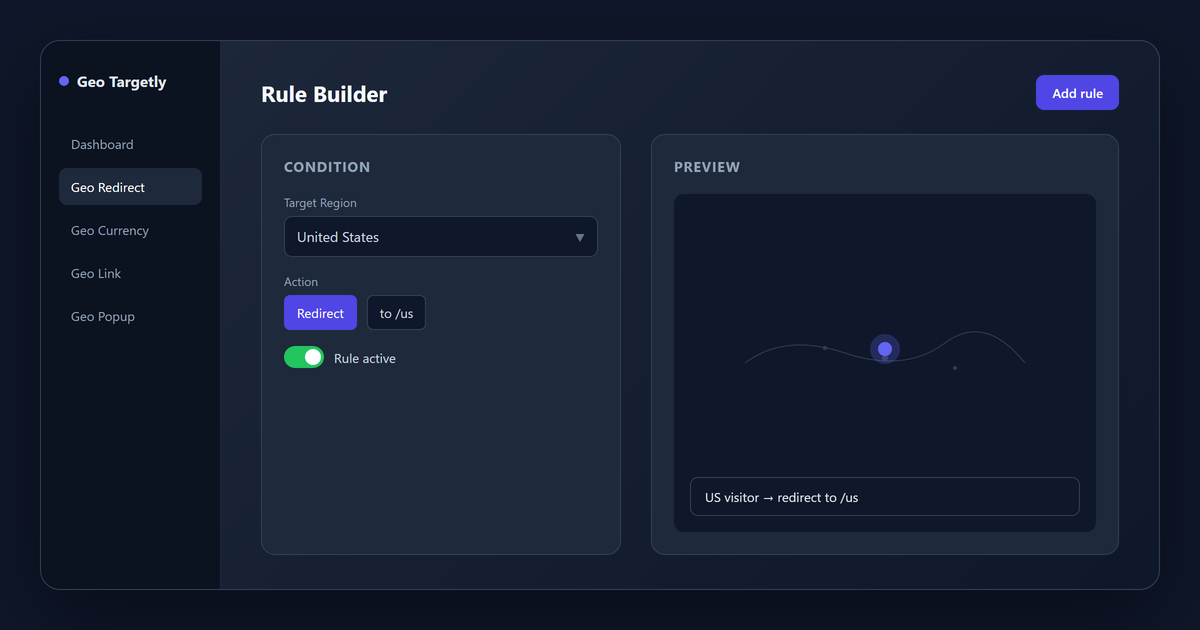
The 13+ Features, Grouped by What They Do for You
Here's the sharpest part of the whole product: every plan includes every feature. You're buying traffic volume, not feature unlocks. Grouped by use case:
① Routing & redirects — get visitors to the right page
- Geo Redirect: redirect a whole site, subdirectory, or single page by country, state, or city — with an optional permission popup that remembers the visitor's choice.
- Geo Link: one smart link that sends people to different landing pages based on location. Ad-split magic.
- Radius / IP targeting: draw a 50-mile radius around a point, or target specific IP ranges.
② Content personalization — same page, different experience
- Geo Content / Geo Image: swap copy and images per region, dynamically.
- Geo Currency: prices display in the visitor's local currency automatically (Geo Targetly says exchange rates refresh several times a day). This is the single most useful feature for cross-border ecommerce.
- Geo Translate: switch the page language by region — no need to build a separate site per country.
③ Marketing moments — turn traffic into conversion
- Geo Popup / Geo Bar: country-specific promo popups, coupons, exit-intent offers, or a top announcement bar.
④ Compliance & traffic hygiene — stay legal, lose the junk
- Geo Consent: shows the right cookie-consent banner for the visitor's region (GDPR/CCPA territory).
- Geo Block: block traffic from regions you don't serve, and flag VPN/proxy users.
Every rule has a test mode where you can simulate different locations before publishing. If you've ever pushed a redirect rule and watched everyone land somewhere wrong, you know how much that's worth.
Pricing: From $9/Month Annually, 14-Day Free Trial
There's no free tier — but there's a 14-day free trial that doesn't ask for a credit card. For a cross-border seller, that's a zero-cost way to verify the tool actually does what you need.
| Plan | Monthly | Annual (per month) | Who it's for |
|---|---|---|---|
| Dev | $12/mo | $9/mo | Small sites getting started (500k pageviews/mo) |
| Startup | $24/mo | $19/mo | Solo sellers, blogs |
| Growth | $49/mo | $39/mo | Stores with steady orders ⭐ best value |
| Business | $99/mo | $79/mo | Multiple sites / agency clients |
| High Traffic | $199/mo | $159/mo | High-volume sites |
| Enterprise | from $349/mo | from $279/mo | Very large traffic; contact sales |
Three things you need to know:
- It meters by monthly pageviews: every page load that runs the script counts — even if the visitor triggers no rules. Do the math on your monthly pageviews before picking a plan, or a traffic spike will force an upgrade.
- All features, every plan: the only difference between tiers is the volume quota, not features. Upgrade or downgrade anytime without penalties.
- Annual billing saves roughly 25%. If you're staying, pay yearly.
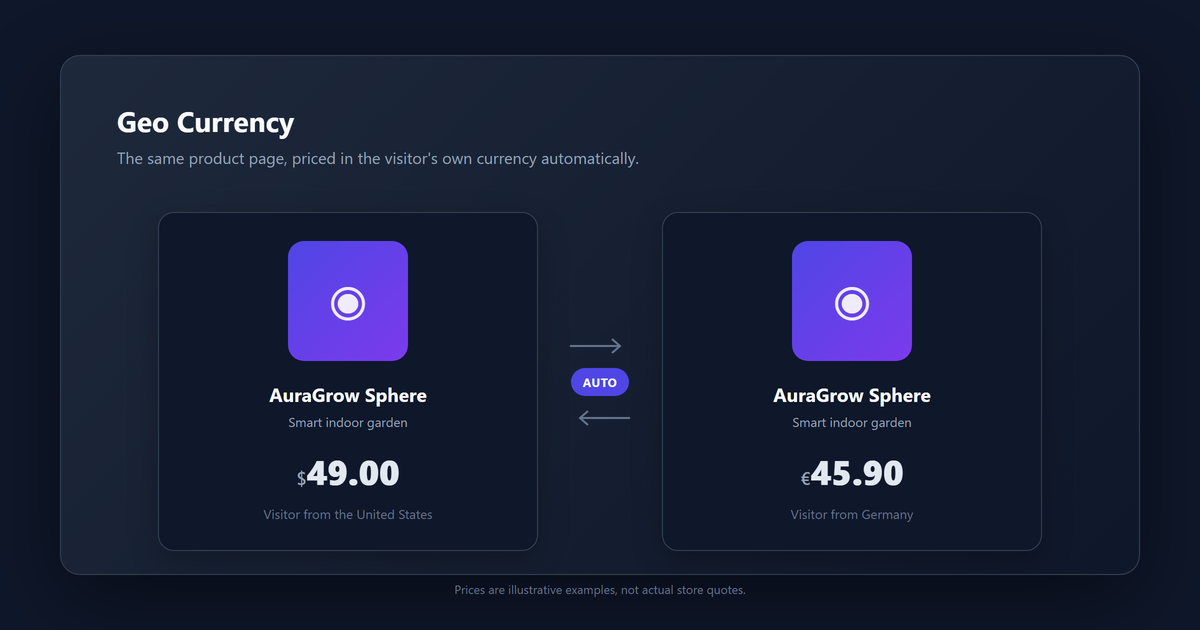
Curious what your store looks like to a visitor in Berlin? 👉 Start your free 14-day trial
14-day free trial · No credit card · Every feature unlockedHow It Compares: Where Geo Targetly Sits in the Market
| Tool | Starting price | Best for | Key difference from Geo Targetly |
|---|---|---|---|
| Geo Targetly | $9/mo (annual) | Cross-border sellers, agencies, going-global SaaS | Full toolkit (redirects + personalization + popups + compliance), one line of code, best value |
| GeoIP Redirect / country-redirect Shopify apps | Free–~$10/mo | "Just redirect by country" | Redirects only — no content, currency, popup, or compliance layer |
| Weglot / Translation Lab | ~$15/mo+ | Pure language translation | Translation-first; no location-driven redirects, popups, currency swaps, or region blocks |
| Dynamic Yield / Optimizely | Thousands/year | Enterprise A/B testing and personalization | Powerful but pricey and complex — overkill for SMBs |
The short version: redirect-only? A Shopify app is enough. Translation-only? Weglot is a better fit. The whole location-driven marketing stack — ad routing, regional compliance, region blocking, currency and language together — Geo Targetly is the most complete option at this price. And at the enterprise-testing tier, the price tag is a different universe.
Accuracy: Let's Be Honest About the Limits
Here's Geo Targetly's own published accuracy ladder (their numbers, not mine):
- Country level: 95–99% — rock solid for international routing.
- State/region level: 80–90% — fine for regional campaigns.
- City level: 70–80% — treat it as a rough filter for major metros, not precision machinery. Geo Targetly's own help center advises against targeting finer than major cities.
Two gotchas that follow: VPN and proxy users will appear at the VPN server's location, and mobile users on cellular networks vary more at city level. So always set a default destination for visitors who resolve wrong — that's the single most repeated piece of professional advice in every review we read.
Who Should Use It — and Who Shouldn't
You're the right fit if you're:
- A cross-border seller juggling multi-currency, multi-language, and region-specific offers — one dashboard handles it.
- An agency or site builder: one account, many client sites, and "a real multi-country experience" becomes a selling point instead of a headache.
- A going-global creator or affiliate marketer: Geo Link lets you route visitors by region to different affiliate offers. That's a genuinely clever play.
Skip it if you're:
- Serving one local market where location never changes the experience — this is just an extra layer you don't need.
- Tiny on traffic — paying $9/month for a feature almost nobody will trigger isn't a good trade.
- Needing deep A/B experimentation or enterprise BI — that's Dynamic Yield territory.
Where It Falls Short (Honestly)
- No free tier: the 14-day trial doesn't need a card, but after that you're paying.
- Pageview metering means a traffic spike = forced upgrade: even if you never touch your rules, a viral post can blow through the quota. It's the biggest hidden cost — plan for it.
- City-level accuracy is meh: 70–80%, plus VPN and mobile misreads. Mitigate with a solid default destination.
- Lots of features = learning curve: the dashboard can feel busy in week one while you wrap your head around rule logic.
- Overkill for purely local sites: if location doesn't matter to the experience, skip it.
Our Final Verdict
In one sentence: Geo Targetly is the most complete, most affordable option in the geo-targeting category — from $9/month you get redirects, content personalization, currency and language swapping, popups, and compliance blocking, and for a cross-border store that ROI is hard to beat.
If you only need country redirects, a Shopify app is simpler. If you only need translation, Weglot fits better. But if you want one dashboard running the full multi-country experience, and you're willing to spend ten minutes learning the rule logic, Geo Targetly is close to the best call — prove it with the 14-day free trial before you pay a cent.
Still showing every visitor the same storefront? 14-day free trial · No credit card · Every feature unlocked [ 🚀 Start your free trial → ] Paste one line of code. In five minutes, every visitor sees their own version.
Transparency: This review is research-based (Channel 2): official feature/pricing pages cross-checked against third-party reviews, August 2026. Affiliate links: see our disclosure.
Pros & Cons
Pros
- One line of JS works on any site (Shopify, WordPress, Webflow, custom)
- Every plan includes the full toolkit: redirects, content/currency/language personalization, popups, compliance blocks
- Lightweight under-50KB async script that does not slow the site
- Most complete geo-targeting stack at this price, from $9/month
- 14-day free trial with no credit card required
- Unlimited domains per account; test mode to simulate locations before publishing
Cons
- No permanent free tier — only the 14-day trial
- Pageview metering means a traffic spike forces an upgrade
- City-level accuracy only 70–80%, and VPN or mobile users may misresolve
- Busy dashboard in week one while learning the rule logic
- Overkill for purely local or single-market sites
Find your geo-targeting fit
One question. We'll point you to the right tool and plan — or tell you to save your money.
Some links on this page are affiliate links. Read our disclosure.
Annie Cole
Lead Reviewer & Software EditorAnnie Cole leads Toolisme's Software category. With a background in content marketing and journalism, she built the scoring rubric used across all reviews and has hands-on tested 40+ SaaS tools. She focuses on project management, CRM, and AI writing assistants.