Keychron Q1 Max Review 2026: The board that turned custom-keyboard specs into a mass-market standard — thickness included

By Trueer Quinn · Creators & Hardware Editor
Trueer is our Creators & Hardware Editor. A visual artist turned tech reviewer, he brings a creator's perspective to video, audio, and hardw
The Keychron Q1 Max is a 75% all-aluminum gasket-mounted wireless custom keyboard that ships with factory foam, screw-in stabilizers and open-source QMK/VIA remapping — an especially easy win for Mac users. But the flaws are just as real: it's thick (22.6mm front / 35.8mm back, ~1.72kg), Bluetooth polls at just 90Hz and stutters in crowded wireless, the stock switches feel mushy, and at ~$180–220 it no longer undercuts same-spec rivals. We pulled together Hardware Canucks' K2 test, The Poor Penman's K4 long-term notes, the Super Best Audio Friends K8 Pro thread, and ~150 aggregated Amazon reviews to map Keychron's confusing Q/V/K/S/Lemokey lineup — so you can decide if it's actually worth your desk.
Our Verdict
The Keychron Q1 Max is a 75% all-aluminum gasket-mounted wireless custom keyboard that ships with factory foam, screw-in stabilizers and open-source QMK/VIA remapping — an especially easy win for Mac users. But the flaws are just as real: it's thick (22.6mm front / 35.8mm back, ~1.72kg), Bluetooth polls at just 90Hz and stutters in crowded wireless, the stock switches feel mushy, and at ~$180–220 it no longer undercuts same-spec rivals. We pulled together Hardware Canucks' K2 test, The Poor Penman's K4 long-term notes, the Super Best Audio Friends K8 Pro thread, and ~150 aggregated Amazon reviews to map Keychron's confusing Q/V/K/S/Lemokey lineup — so you can decide if it's actually worth your desk.
Who It's For
Mac users, writers and office typists, anyone who wants all-aluminum gasket feel and open-source remapping without DIY foam-and-lube
Who Should Skip
People used to low-profile boards or sore wrists who won't add a wrist rest; anyone needing wireless low-latency gaming; budget buyers who want the same spec for less
Keychron Q1 Max Review: the Barrier-Lowering Custom Board That Keeps the Height
Let's be clear up front: this isn't a sponsored post. We don't take money from Keychron, and we're not going to ding it just to look objective. Everything below comes from Hardware Canucks' hands-on K2 test, The Poor Penman's long-term K4 notes, the Super Best Audio Friends forum thread on the K8 Pro, and roughly 150 aggregated Amazon reviews (2024–2026). The good and the bad are both real voices from the market.
Quick Verdict
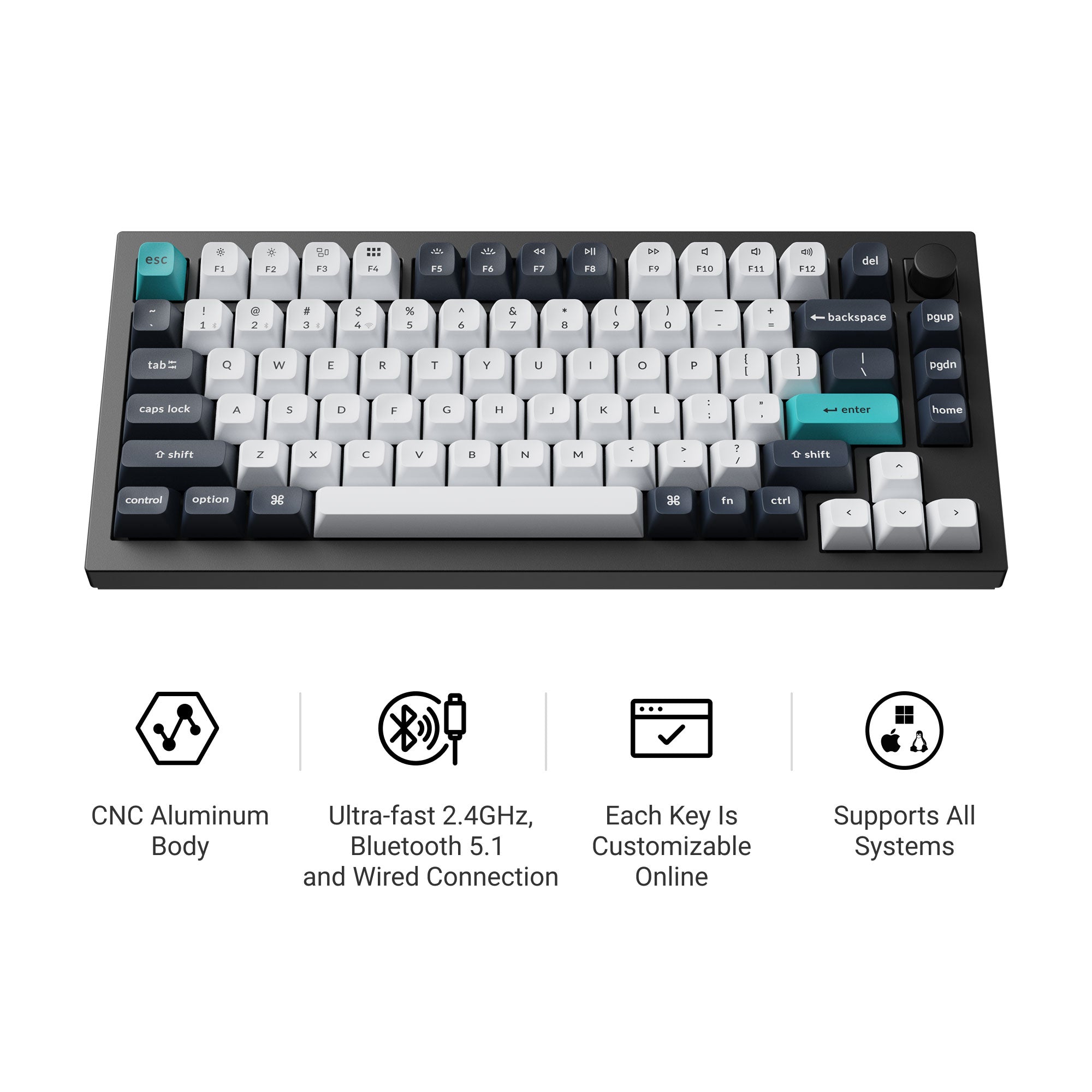
Keychron's core trick is taking what used to be niche custom-keyboard hardware — gasket mount, sound foam, screw-in stabilizers, open-source QMK/VIA remapping — and shipping it at near-production prices. The Q1 Max is the wireless aluminum flagship of that line: full-aluminum body, tri-mode connection, low-latency 2.4GHz, and great to type on the moment you unbox it.
But it is absolutely not a "perfect board." The thickness, the Bluetooth behavior, the stock switch feel, and the price-value debate are all real, repeatedly-cited complaints. If you can live with the height, add a wrist rest, and aren't chasing the absolute best deal, it's a wonderfully fuss-free pick. If not, the flaws below will probably sting.
Who Is Keychron, and Why Bother Mapping the Lineup?
Keychron launched in 2017 with a tight focus: mechanical keyboards for Mac users. Early 2018 brought the K1 wireless mechanical board to Kickstarter, raising over $1M; the K2 later that year became the breakout hit at over $1.4M. K2's killer formula still holds: compact 75% layout, hot-swap (later versions), Mac/Windows dual support, and a $69–79 price.
In 2021 Keychron entered the custom market with the Q1: a 75% all-aluminum gasket board at $169 with QMK/VIA and hot-swap — money that, back then, only group-buy players spent. The Q line then expanded to the Q2 (65%), Q3 (TKL), Q5 (1800 compact), Q6 (full size); 2022 added the cheaper V series, dropping the Q's PCB and layout into an ABS plastic case at $64–84.
By 2023–2024 Keychron spun up the gaming sub-brand Lemokey and Hall Effect magnetic-switch versions (Q1 HE, K2 HE, and so on), selling globally via Amazon and its own store. For ordinary buyers, it's now a name you can't avoid in the mechanical-keyboard market.
Decoding the Keychron Lineup: Number + Letter + Suffix
Keychron's naming is notoriously confusing. Really, you only need three axes:
| Axis | Meaning | Examples |
|---|---|---|
| Number | Physical layout / size | Q1/V1/K2 = 75%; Q3/V3/K8 = TKL; Q5/V5/K5 = 1800 compact; Q6/V6/K10 = full size |
| Letter | Product tier | K entry Bluetooth; V budget custom, plastic case; Q flagship aluminum; S slim aluminum; Lemokey gaming sub-brand |
| Suffix | Connection / generation | No suffix = wired base; Pro = adds Bluetooth + hot-swap; Max = adds 2.4GHz + 1000Hz; HE = Hall Effect magnetic; Ultra = 2025 update with 8K polling |
The same number across different letters usually means the same physical layout. Q1 and V1 are both 75%; Q3, V3 and K3 are all TKL. Once that clicks, the model names stop spinning.
Series at a Glance
K Series: Entry Wireless, the Volume Workhorse
The K line is Keychron's best-seller: Bluetooth wireless, plastic case, cheap. Early K boards had no remapping and used a tray mount.
- K Pro: adds QMK/VIA, gasket, PBT caps, hot-swap. Flagship example: K8 Pro (TKL, ~$109).
- K Max: adds a 2.4GHz dongle and 1000Hz polling on top of K Pro. Examples: K2 Max, K8 Max, K10 Max.
- K3 / K5 / K7: low-profile slim series, front height well below a normal mechanical board — for anyone who found the Q1 Max too tall.
V Series: Budget Custom, the Smartest "Hidden" Buy
The V series uses an ABS plastic case but keeps gasket, hot-swap and QMK/VIA. The common Reddit verdict: V1/V5 Max is the "smart money" — it shares most of the Q Max's core traits at roughly 60% of the Q Max price. The only downsides are the plastic case, a slightly less premium sound, and no 2.4G (until the V Max). If you're new and unsure whether aluminum is worth the premium, the V series is the more rational starting point than the Q.
Q Series: All-Aluminum Flagship, Where the Q1 Max Sits
The Q line is high-end: CNC aluminum, gasket, QMK/VIA and hot-swap as standard. The suffix sets the connection:
- Q: wired base, gradually phased out of the main push.
- Q Pro: adds Bluetooth, e.g. Q1 Pro (~$199).
- Q Max: adds 2.4GHz wireless + 1000Hz polling + extra dampening — this review's star, Q1 Max (~$180–220 street).
- Q HE: Hall Effect magnetic switch, rapid trigger and adjustable actuation, e.g. Q1 HE (~$219).
- Q Ultra (2025 line): 8K polling, 2.4GHz wireless, ZMK open-source firmware.
S Series: Slim Aluminum, Low-Profile
The S1 is a 75% all-aluminum low-profile board, wired, thinner and more premium than the K3. For users who want MacBook-thin with mechanical feel kept.
Lemokey: the Gaming Sub-Brand
Lemokey leans low-latency and gaming features. The L series (L3, L4) is all-metal 2.4G gaming; the P series (P1) is a cheaper 75% gaming board; the X series is entry-level wired. The P1 HE uses magnetic switches at a price close to the Q1 Max, but points a completely different direction.
Q1 Max Deep Dive: a Flagship With Real Flaws
With the lineup sorted, let's focus on the Q1 Max. Its core specs (from the official page and major retail listings):
- Layout: 75%, CNC all-aluminum body
- Dimensions / weight: 22.6mm front height, 35.8mm back height, ~1.72kg
- Connection: 2.4GHz wireless (1000Hz) + Bluetooth 5.1 (90Hz) + USB-C wired
- Structure: gasket mount, PC plate, multi-layer dampening foam
- Switches: Gateron Jupiter pre-lubed, hot-swappable (3-pin/5-pin)
- Keycaps: double-shot PBT, KSA or OSA profile
- Battery: 4000mAh, ~180h with no backlight, ~100h at low RGB
- Remapping: QMK/VIA + Keychron Launcher web app
The Objective Strengths
Shipping flagship spec as the default is its biggest gift. A few years back, doing custom meant buying switches, lubing them, taping the PCB, stuffing foam, tuning stabilizers. This newer generation — the K8 Pro is the poster child — ships with screw-fixed PCB stabilizers and multi-layer silicone/foam dampening built in. A Super Best Audio Friends user (purr1n) put it plainly: "nothing to do but swap switches," with the usual structural damping and stabilizers already integrated at the factory. That "lowering the custom barrier" positioning is the most praised thing about Keychron.
Cross-platform support is a real moat. The native Mac support isn't a gimmick: a physical toggle plus two keycap sets make switching between Mac/Windows/Linux nearly frictionless. In the ~150 aggregated Amazon reviews, "seamless switching between Mac and Windows" is one of the most upvoted points.
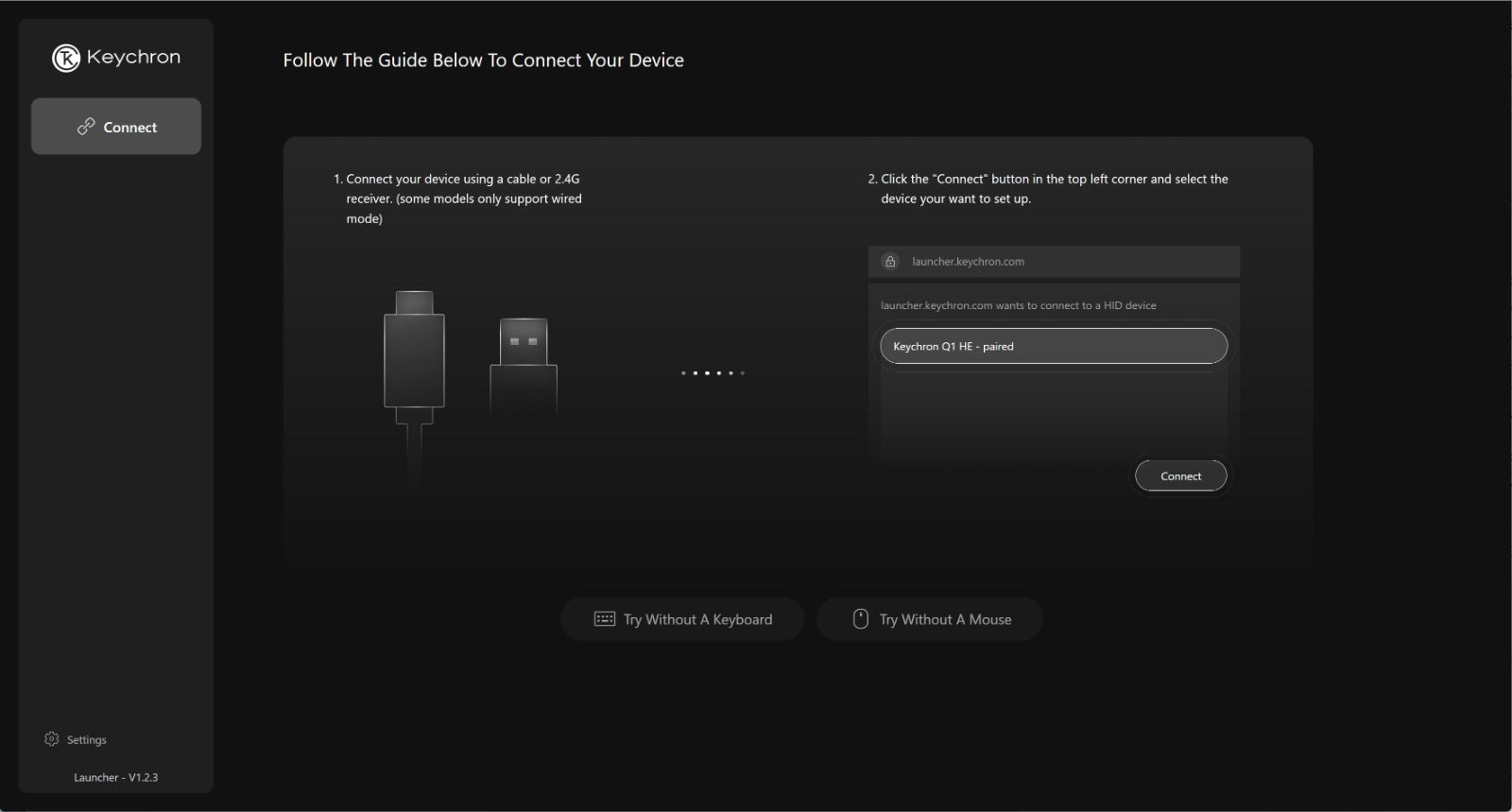
Web-based remapping, no junk client. It supports both VIA (deep) and the official Launcher (simple) — keymaps, macros and lighting all done in the browser, with no bloated desktop app camping in your background. For anyone who hates "installing a 200MB program just to rebind one key," this is a relief.
2.4GHz wireless is a genuine upgrade. Compared with early K boards that ran Bluetooth-only, the Q1 Max adds a 2.4GHz dongle at 1000Hz. Amazon reviews and multiple long-form notes on Keychron's own store mention "wireless flawless" and "no typing delay" — though, to be fair, those are typing/office scenarios, not esports.
Sound and feel are solid. The Q Max adds extra dampening, and paired with the gasket structure and PC plate, the Gateron Jupiter switches land in a muted "thock" rather than a hollow echo. For someone who won't tinker, that's a sound you get to enjoy on day one.
The Tested Flaws
Height and front rise are the unavoidable sore point. Hardware Canucks, testing the K2, flatly called it "the thickest keyboard we've encountered" — flat base plus slightly angled caps meant wrist strain even before the feet went up, and worse after. Their advice: "a wrist rest is mandatory, or your pinky fights Ctrl/Shift." The Q1 Max, as the aluminum flagship, specs a 22.6mm front and 35.8mm back height — far taller than low-profile rivals — and at 1.72kg it's not going anywhere in a bag. The conclusion is direct: if you're coming from low-profile boards, your wrists tire easily, and you won't add a wrist rest, the height alone will talk you out of it.
Bluetooth stability and QC occasionally drop the ball. Hardware Canucks' K2 simply refused to pair over desktop Bluetooth and had to fall back to wired. Communities (Reddit, SBAF) also report Keychron Bluetooth occasionally lagging or dropping characters in crowded wireless. As production scaled, QC has been uneven — a few users hit key chatter or board faults. The Q1 Max's 2.4GHz mostly fixes this, but Bluetooth polls at only 90Hz; if "wireless low-latency gaming" is a must, go wired or 2.4G and don't gamble on Bluetooth.
Stock switches and caps are hit-or-miss. Entry K boards ship ABS caps that shine quickly; basic Gateron browns feel soft with weak tactility. The SBAF K8 Pro thread is more specific: stock caps are "thin and tall, slightly wobbly," and the Gateron Brown ramps pressure sharply before 1.5mm without actuating — described as "mushy." In other words, if you chase the ultimate feel, you'll likely swap in a Cherry-profile PBT set, maybe even the switches. What you get is an "80/100 out of the box," not "100/100."
Price debate: some feel it's steep for the component life. The Q1 Max street price is ~$180–220. One aggregator's verdict flatly notes it "draws criticism for feeling overpriced relative to component longevity." Same-spec emerging brands and overseas custom shops have pushed prices lower — if you're counting specs per dollar, the Q1 Max isn't the cheapest. Its premium buys brand-consistent QC, mature Mac compatibility, and the fuss-free "works on arrival" experience.
Which One Should You Buy? Quick Match by Need
| Your situation | Recommended series | Rough budget | Why |
|---|---|---|---|
| Tight budget, just trying mechanical | K8 Pro / V1 | $79–109 | Hot-swap, QMK/VIA, no premium for aluminum |
| Want the Q1 Max feel but cheaper | V1 Max / V5 Max | ~$100–130 | Shares 75%/1800 layout, plastic case + 2.4G |
| Want aluminum + tri-mode + fuss-free | Q1 Max | $180–220 | This review's star, the most balanced aluminum flagship |
| Want low-profile, thin, Mac office | K3 Max / S1 | $94–150 | Solves the height problem |
| Want gaming low-latency / magnetic | Lemokey P1 HE / Q1 HE | $150–220 | Hall Effect rapid trigger |
| Want full-size + numpad | Q5 Max / Q6 Max / K10 Max | $180–220 | Same line, larger layouts |
Competitor Map (Amazon affiliate links, 1–2 is plenty)
If the Q1 Max's flaws have you looking at same-price or same-position alternatives, here are real rivals in the overseas market. We picked only brands Western buyers know and that are available on Amazon:
- Too thick, want Mac-friendly → NuPhy Air75 V2: ~$129, low-profile, ~16mm front height, tri-mode, native Mac caps, QMK/VIA support. It solves exactly the Q1 Max "thickness" pain. If the 22.6mm front height gave you pause, this is the most direct counterpart.
- Want all-aluminum custom, similar budget → Glorious GMMK 3 Pro: ~$190, all-aluminum body, modular gasket, 5-pin hot-swap, per-key RGB, side lighting. It's one of the Q1 Max's most direct same-tier rivals in the US market, with a mature community ecosystem.
- Want gaming low-latency → Lemokey P1 HE: ~$120–150, Keychron's own gaming sub-brand, Hall Effect magnetic switch, rapid trigger, 2.4GHz low latency. If you want Keychron's after-sales but a gaming direction, it actually fits better than the Q1 Max.
If you're weighing the Q1 Max against alternatives, these two are the most natural Amazon picks:
Who Should Buy, Who Should Skip
Buy it if: you're a Mac user or an office typist; you want all-aluminum gasket feel and open-source remapping but won't DIY lube-and-foam; you can accept the height and will add a wrist rest; you're happy with "wireless typing is stable" and won't play competitive games on it.
Skip it if: you're used to low-profile boards and sore wrists without wanting a wrist rest; you demand wireless low-latency gaming (don't bet on Bluetooth); you're budget-sensitive and want the same spec for less (V1 Max or K8 Pro are the smarter buy).
Buying Notes
- Version choice: the Q1 Max comes barebone (no switches/caps, for those with their own) and fully assembled. Switches include Gateron Jupiter red/brown/silent/banana; when unsure, start with red (smooth linear) or brown (light tactility).
- Add a wrist rest, non-negotiable: this isn't optional. The 22.6mm front height puts clear pressure on a bare wrist; the official walnut rest or a third-party memory-foam rest both help.
- Price reference: street price ~$180–220. Amazon sales events can go lower; far below that range, watch for third-party refurb or fakes.
- First thing after unboxing: swap in a nicer PBT keycap set (Cherry profile) — feel and sound step up again. It's the single most-recommended "necessary mod" in the community.
Verdict
The Keychron Q1 Max is a clearly-positioned board: it puts what used to be niche, tinkery custom-keyboard experience into ordinary users' hands at production scale. For Mac/Windows dual users who want all-aluminum gasket feel and don't want to DIY, it's the fuss-free flagship choice.
But its downsides are just as real: thick, heavy, Bluetooth that occasionally stumbles in busy environments, stock switches/caps that aren't peak, and a price that's no longer such a steal against newer rivals. It's not a "buy and never regret" hexagon warrior — it's a product where the pros and cons are both loud. If you don't mind the height and will pay a little premium for fuss-free, it belongs in your cart; if you care more about slim, gaming low-latency, or top-tier value, it's probably not your best answer.
Pros & Cons
Pros
- Full CNC aluminum + gasket mount with factory sound dampening — a genuinely solid, thocky typing sound out of the box
- 2.4GHz wireless + Bluetooth 5.1 + wired; 2.4G runs at 1000Hz and stays rock-stable
- Physical Mac/Windows toggle + two keycap sets — cross-platform support is Keychron's real moat
- VIA / official web Launcher for remapping, no bloated desktop client, hot-swappable
Cons
- Thick and heavy (22.6mm front, 35.8mm back, 1.72kg) — you'll want a wrist rest for any long session
- Bluetooth polls at only 90Hz and can lag or drop characters in busy wireless environments — don't bet on it for low-latency gaming
- Stock switches (Gateron Jupiter / basic browns) feel mushy and lack definition; keen typists will swap switches and caps
- At $180–220, some buyers call it overpriced against component longevity — same-spec rivals have gotten cheaper
Some links on this page are affiliate links. Read our disclosure.
Trueer Quinn
Creators & Hardware EditorTrueer is our Creators & Hardware Editor. A visual artist turned tech reviewer, he brings a creator's perspective to video, audio, and hardware reviews. His creative work has appeared in three digital art exhibitions.