Buffer Review 2026: Turns 'posting every day' into 'queueing once a week' — clean enough to need zero learning curve

By Annie Cole · Lead Reviewer & Software Editor
Annie Cole leads Toolisme's Software category. With a background in content marketing and journalism, she built the scoring rubric used acro
Buffer is the easiest multi-platform social scheduler on the market: connect Instagram, X, LinkedIn, TikTok and 11+ others, queue a week of posts, let the AI assistant rewrite each one for the platform's tone, and check which posts actually grew your account. The free plan gives you 3 channels with 10 scheduled posts each; paid plans bill per channel (Essentials $6/channel/mo, Team $12/channel/mo, ~20% off billed annually) with a 14-day free trial. It's not for teams that need social listening, competitor tracking or deep analytics — that's Hootsuite and Sprout's turf.
Our Verdict
Buffer is the easiest multi-platform social scheduler on the market: connect Instagram, X, LinkedIn, TikTok and 11+ others, queue a week of posts, let the AI assistant rewrite each one for the platform's tone, and check which posts actually grew your account. The free plan gives you 3 channels with 10 scheduled posts each; paid plans bill per channel (Essentials $6/channel/mo, Team $12/channel/mo, ~20% off billed annually) with a 14-day free trial. It's not for teams that need social listening, competitor tracking or deep analytics — that's Hootsuite and Sprout's turf.
Who It's For
Solo creators, freelancers, small brands — anyone who wants 'set it once, post all month' without learning a complex tool
Who Should Skip
Teams that need social listening or competitor tracking, matrix operators managing 8+ channels, brands that live on deep analytics
Buffer Review: From "Posting Every Day" to "Queueing Once a Week"
Picture an indie shop owner cycling through three logins every morning — Instagram, X, LinkedIn — just to post. That ritual eats the first 40 minutes of her day. It's the most common reason creators and small brands start shopping for a scheduler at all.
The first instinct is usually "Hootsuite? Isn't that for big companies? Expensive and complicated." Fair — the enterprise tools are built for teams with approval flows and listening dashboards. The lightweight end of the market is where most small operators actually land, and Buffer is the name that keeps coming up there.
The pitch is simple: connect your accounts once, queue a week of posts, and the scheduler handles the rest. Setup is often quoted in minutes, and the free plan covers three channels — enough to start without a card. That's the story everyone tells; the rest of this review is what the tool actually does, what we personally touched, what real users report, and where the reviews disagree.
Quick Verdict
It's the easiest multi-platform scheduler you can buy — but "easy" is the whole trade: no social listening, no competitor tracking, no cross-channel benchmarks. Fits solo creators and small teams; doesn't fit operators who live on deep data. Everything else you need is in the table:
| Dimension | Bottom line |
|---|---|
| Ease of use | ★★★★★ Near-zero learning curve, accounts connected in ~10 min |
| Platform coverage | 11+ channels, including Threads / Bluesky / Mastodon |
| Free plan | 3 channels, 10 posts each, AI assistant included, no card |
| Paid pricing | Per channel: Essentials $6/channel/mo, Team $12/channel/mo |
| Where it stumbles | Shallow analytics, per-channel costs at scale, single-user base tiers |
| Real-world ratings | G2 4.3 / Capterra 4.5 (Trustpilot 2.1 — intermittent posting issues) |
Get it if: you're a solo creator, freelancer, or small brand that wants "set it once, post all month" — and doesn't want to spend a weekend learning a tool.
Skip it if: you need listening, competitor analysis, or deep reports; you manage 8+ channels; your team needs approval flows and granular permissions.
Our testing stance: this review is part hands-on, part research. Hands-on: we registered for the 14-day free trial and connected three social channels (Instagram, TikTok, LinkedIn) — no credit card anywhere, and we've got the dashboard screenshot to prove it. What we did not do: queue a real campaign, use the AI assistant, or touch Analytics, the Engagement Inbox, or Start Page. Everything about those features below comes from Buffer's official feature and pricing pages (verified August 2026) and aggregated user reviews from G2 (4.3/5, 1,000+ reviews), Capterra (4.5/5, 4,800+ reviews), Trustpilot (2.1/5, 93 reviews) and Reddit threads — collected August 2026. Every "users report" claim is cross-checked across at least two of those sources; prices and ratings are real, not invented.
14-day free trial · no credit card required · auto-downgrades to Free when it ends
What We Actually Touched (and What We Didn't)
Straight up, so nobody gets misled later: we took the 14-day free trial (during the trial your account sits on the Team tier, so every paid feature is unlocked). No credit card at any point — that matters, because "14-day trial, must enter a card, forget to cancel, charged for a month" is a real pattern in this category. When the trial ends without a payment method attached, you drop back to Free automatically. Nothing gets charged unless you opt in.
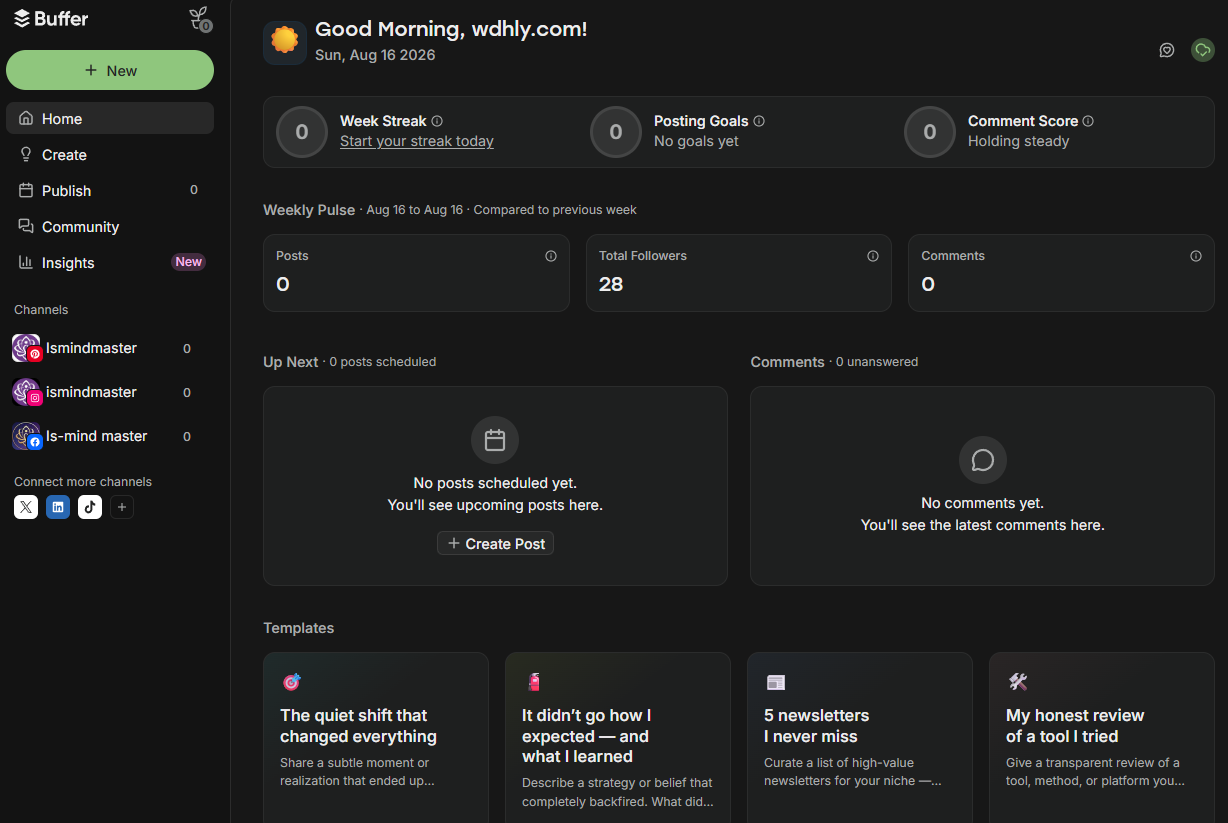
Connecting channels was smoother than expected. The Channels panel showed three connected accounts: two Instagram (ismindmaster), one TikTok (same handle), one LinkedIn (ls-mind master). Standard OAuth each time — log into the target account in another tab, come back, approve. One thing worth knowing up front: Instagram requires a Business or Creator account; personal profiles only get publish notifications from Buffer, they won't actually post.
The first dashboard view is the screenshot at the top: "Good Morning, wdhly.com!", Total Followers 28, Posts / Comments / Week Streak all at zero. Pure fresh-account energy. What that screen quietly teaches you: the free tier caps you at 3 channels (we were sitting right at the wall) and 10 queued posts per channel — not a monthly quota, you refill as posts go out. Cross either line and you're looking at Essentials.
Real details from our session (plus one from the help center, flagged as such):
- No forced credit card — genuinely rare in this category. The free plan doubles as a real long trial.
- Free tier is exactly 3 channels — when we hit the third connection, a "+ Connect more channels" prompt appeared below the list. A soft nudge, not a blocker, but it spells out the ceiling.
- Channel tokens expire (help center + user reports, Channel 2): LinkedIn runs roughly 60 days, Instagram/Facebook refresh more often. You go back into Buffer and hit Refresh, or scheduled posts silently fail. It's the most commonly cited "gotcha after a month of use" across help docs and user feedback.
Core Feature 1: Scheduling to 11+ Platforms From One Place
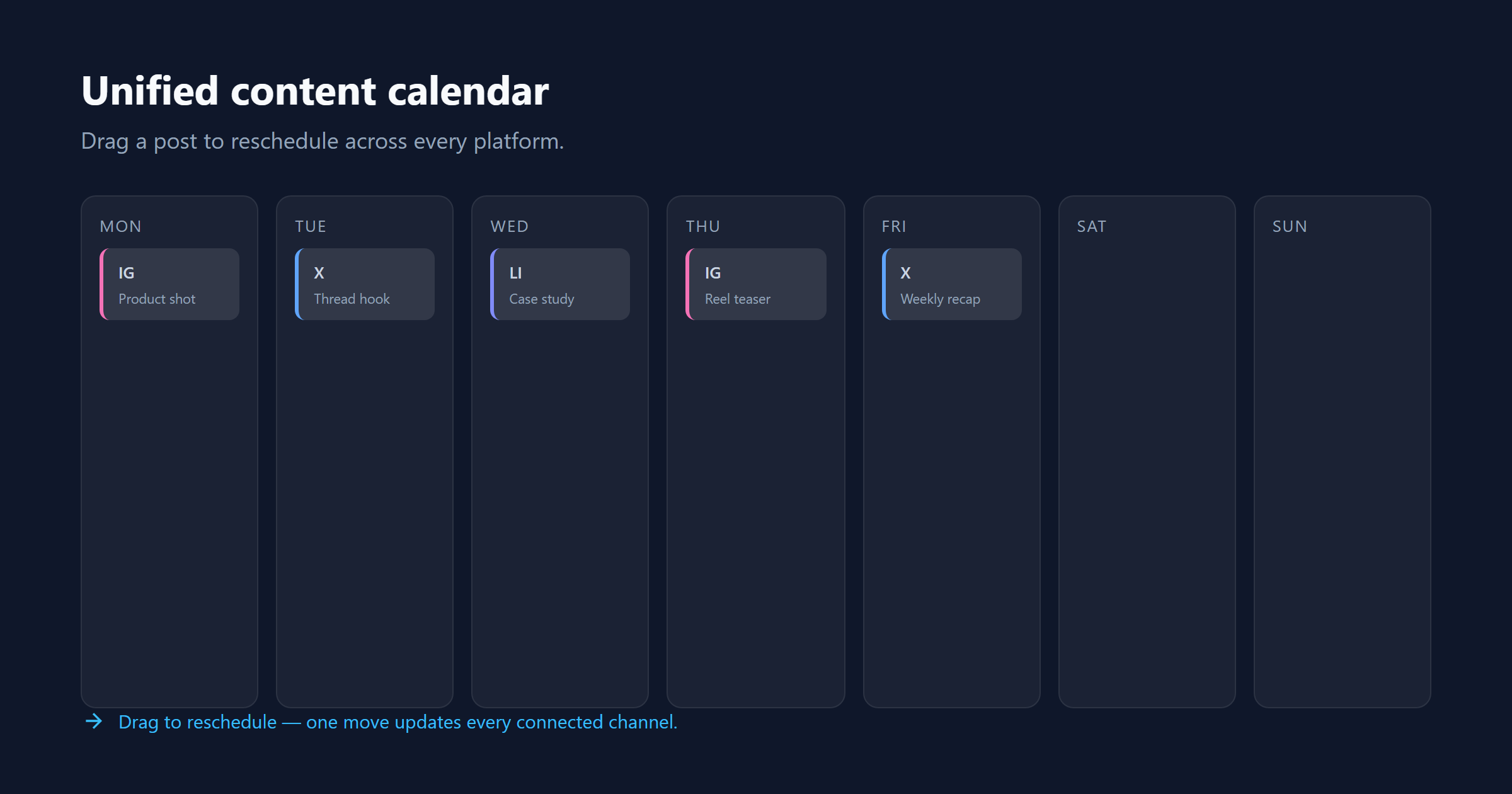
Buffer connects to Instagram (feed, Reels, Stories), Facebook, X, LinkedIn, TikTok, Pinterest, YouTube (including Shorts), Threads, Bluesky, Mastodon and Google Business Profile.
The heart of it is the Queue + Calendar double view. Set your weekly posting times once (Posting Schedule), then "Add to Queue" drops new posts into the next open slot. Or pick "Set Date and Time" for something that has to go out at a precise moment — those get marked Custom and don't drift when you rearrange the queue. The calendar view is drag-and-drop: pull a post to a new day or time slot, or drag a draft from the sidebar straight onto the calendar. Inside the queue you can reorder by dragging, or hit Shuffle to mix up the first 200 posts.
The free plan caps each channel at 10 queued posts; paid plans are effectively unlimited (fair-use cap applies).
What users report: the most repeated setup story across G2 and Capterra is that connecting Instagram, X and LinkedIn takes under ten minutes. That's the root of the "near-zero learning curve" reputation. The calendar drag-and-drop plus queue auto-fill combo is the feature set reviewers call the least painful part of onboarding.
Core Feature 2: AI Assistant (Unlimited on Paid)
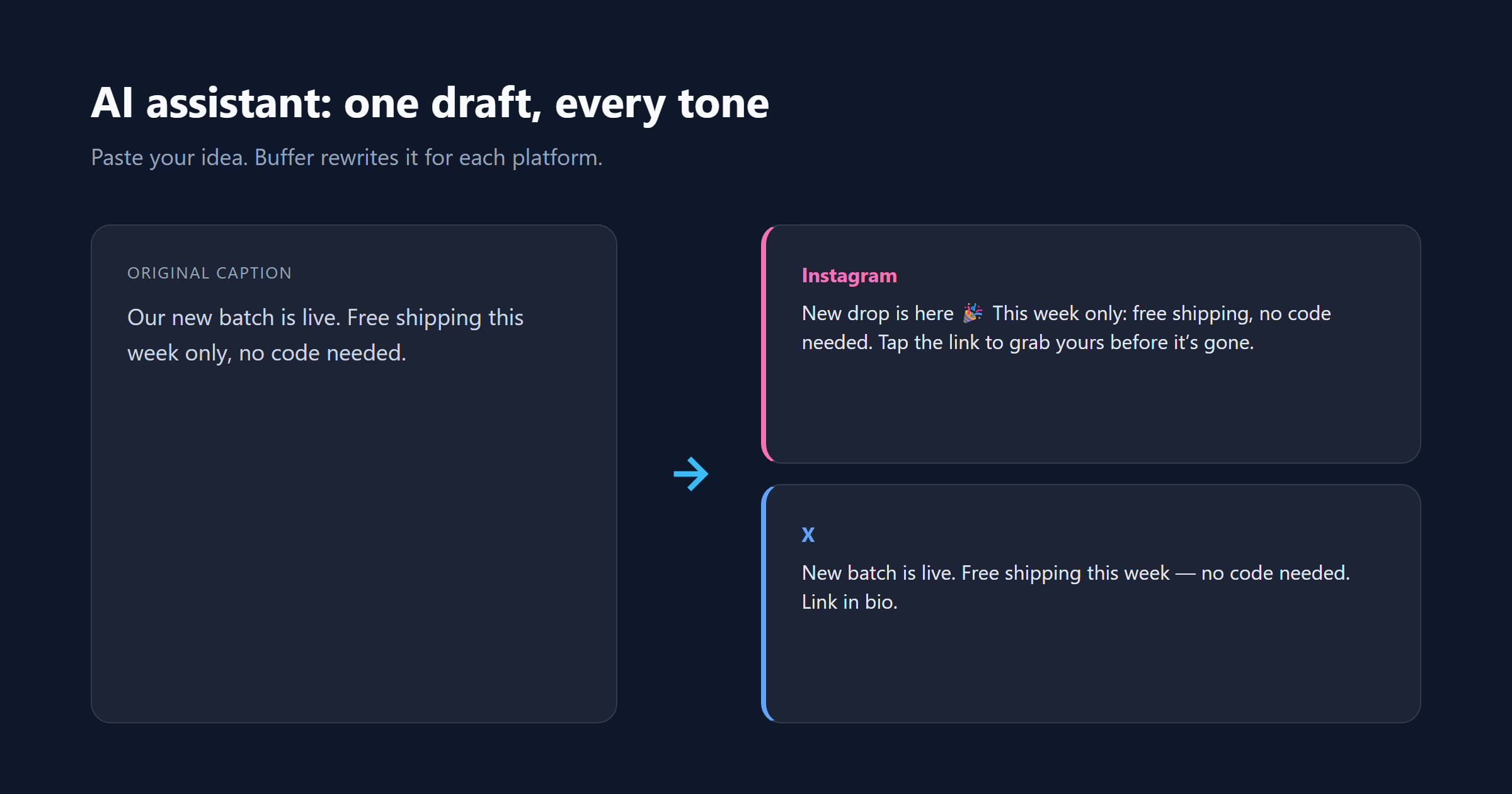
The assistant lives right inside the composer. It writes from scratch, rewrites and adjusts tone (professional / casual / witty), adapts copy per platform (LinkedIn more formal, X shorter), and can split a long post, blog or press release into per-platform shorts. Buffer's own feature pages position it as "one draft, every platform."
Whether it's free is a little murky in the wild: some official and user sources say the Free plan includes it (unlimited or high-capacity), older material says it's mostly paid. Go by what buffer.com/pricing and the product actually show today.
What the docs show: the assistant rewrites one piece of copy to match each platform's tone in one pass — a formal paragraph becomes a snappy X short. The standout part, confirmed on Buffer's official feature pages: no credit system. Paid plans use it unlimited. That's rare, and it's generous.
What users report: the community consensus across G2, Capterra and Reddit (collected August 2026) is that it kills the "staring at a blank page" problem for everyday operational copy, but brand-sensitive content still needs a human pass. Nobody's calling it a replacement for a copywriter — it's a strong first draft machine.
Core Features 3–5: Analytics, Engagement Inbox, Start Page
Analytics / Insights — yes, it exists. Free gives you the basics: follower growth, engagement, per-post performance. Paid adds longer date ranges, custom metrics, AI takeaways and exportable reports. Platform history is limited on some channels (X, for example, mostly only shows data from after you connect).
Engagement / Community Inbox — a unified comment inbox covering Facebook, Instagram business profiles, Threads, LinkedIn, X and Bluesky. Reply and manage without hopping logins. Some of it is in the free plan.
Start Page — Buffer's built-in link-in-bio page. Add links, images, video, an email signup. Heads up: it counts against your channel limit (one of the free tier's 3 slots).
Straight talk on the weak spot: Buffer answers "how did this post do?" — not "what should I do next?". No cross-channel benchmarks, no competitor views, no audience breakdown. If those matter, you'll pair it with another tool.
Pricing: Per Channel, Cheap to Start, Stings at Scale
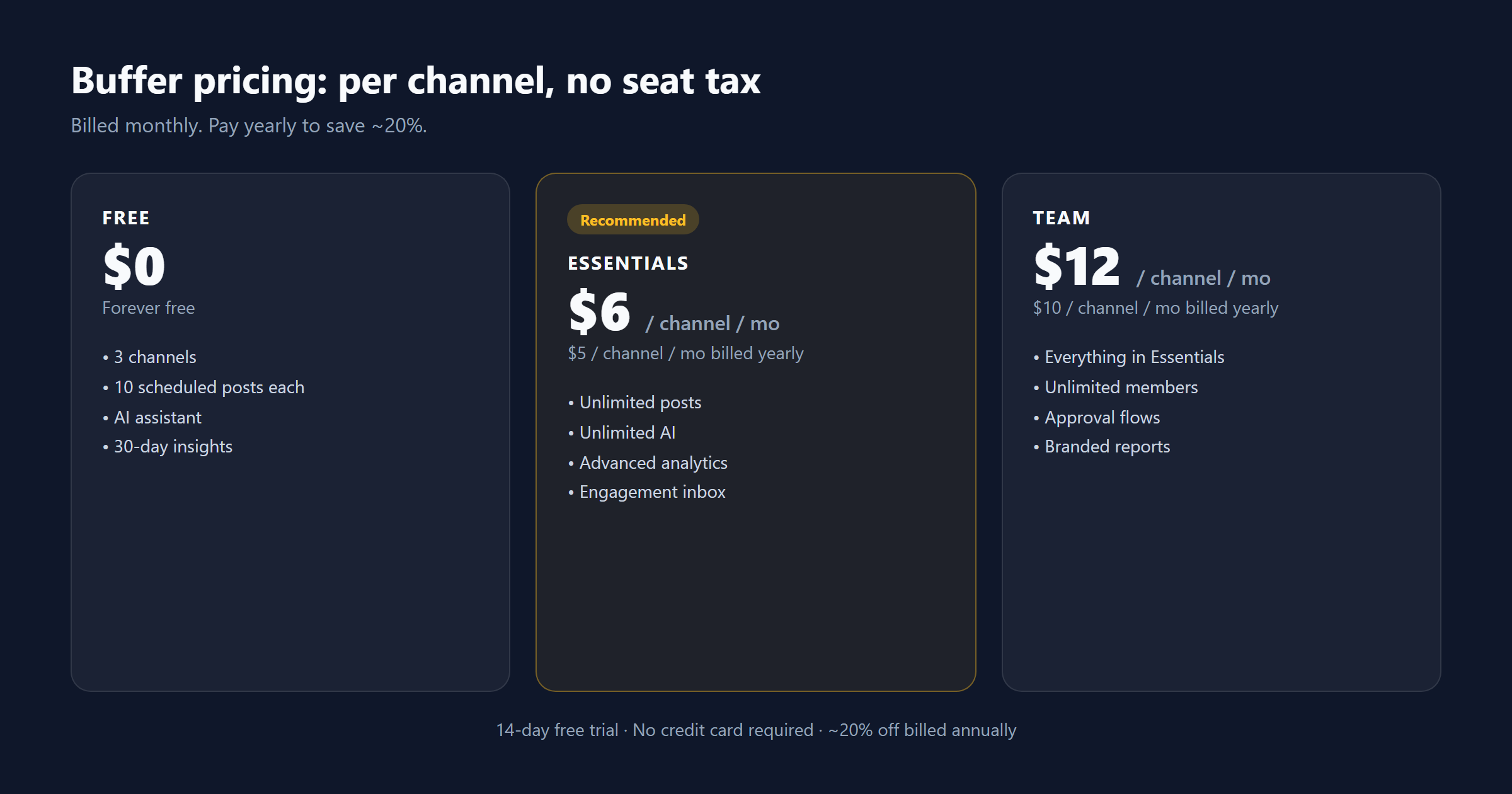
Buffer charges per connected channel, not per seat. One channel, one bill. Five channels, five bills. That's a blessing at small scale and the thing that stings later.
| Plan | Price | What you get | Best for |
|---|---|---|---|
| Free | $0 | 3 channels, 10 scheduled posts each, AI assistant, 30-day insights | Trying it out, solo creators |
| Essentials | $6/channel/mo (or $5/mo billed annually) | Unlimited posts, unlimited AI, advanced analytics, engagement inbox | Solo creators & small brands taking it seriously |
| Team | $12/channel/mo (or $10/mo billed annually) | Everything in Essentials + unlimited members, approval flows, custom permissions, branded reports | Small teams |
Details worth knowing:
- 14-day free trial on all paid plans. No card required. When it ends, you drop back to Free automatically — nothing is charged unless you choose to stay.
- Billed annually saves ~20% — two months effectively free.
- Nonprofits get 50% off.
- 10+ channels triggers volume pricing — per-channel rate drops as you scale.
- No PayPal — cards only (Visa, Mastercard, Amex, JCB, Discover, Diners Club).
The math we'd do: stay free at 3 channels; at 4–5 channels, Essentials runs $24–30/mo monthly or $20–25/mo annual; past 6, do the math — at $40–50/mo, flat-rate rivals start to look good.
14-day free trial · no credit card required · auto-downgrades to Free when it ends
How It Stacks Up Against the Competition
| Tool | Position | Strengths | Weaknesses | Best for |
|---|---|---|---|---|
| Buffer (this review) | Minimalist scheduler | Fastest to learn, honest free plan, broadest new-platform coverage, unlimited AI | Shallow analytics, per-channel cost, no listening | Solo creators / small teams |
| Hootsuite | Enterprise all-rounder | Social listening, competitor analysis, full approval flows | Pricey ($99+/mo), heavy interface | Mid-to-large companies |
| Sprout Social | Enterprise premium | Deep analytics, listening, CRM integration | Among the most expensive | Brands / agencies |
| Later | Instagram visual-first | Best-looking visual planning | Weaker multi-platform flexibility | Instagram-heavy users |
| Publer / Metricool | Lightweight budget | Cheap, plenty capable | Thinner brand track record | Budget-sensitive |
Bottom line: want simple, want a real free tier, want broad coverage → Buffer. Need listening, deep reports, or team approval chains → Hootsuite or Sprout.
The Decision Logic (compiles into a Quiz)
💡 Answer these four questions in order, and you land on the right call.
- How many channels do you manage?
- 1–3 → go to Q2
- 4–6 → go to Q3
- 7+ → Verdict: don't pick Buffer — look at flat-rate rivals (Publer / Metricool / SocialPilot)
- Solo or team?
- Solo → Verdict: Free plan — 3 channels, 10 posts each, plenty to start
- Team (needs collaboration) → go to Q4
- Need deep analytics or listening?
- Scheduling + basic numbers only → Verdict: Essentials ($6/channel/mo)
- Listening, competitor views, deep reports → Verdict: skip Buffer — Hootsuite / Sprout
- (Team scenario) Need approval flows?
- Yes → Verdict: Team plan ($12/channel/mo)
- No → Verdict: Essentials is enough — share the login
Where It Stumbles: Real Complaints, Not Polished Over
Buffer's Trustpilot score is a rough 2.1/5 (93 reviews) — a loud contrast to G2's 4.3/5. The negative threads cluster around:
- Failed or duplicate posts. Trustpilot and recent Reddit threads (2024–2025) both mention scheduled posts that don't go out, or go out twice. Mostly intermittent — but if you're running fully hands-off, that stings.
- Accounts dropping. Some users report connected accounts disconnecting and needing re-authorization.
- Slow support. One of the most common Trustpilot complaints.
- Per-channel cost creep. 8 channels = $40+/mo, 10 channels = $50+/mo. One G2 reviewer put it plainly: "once the bill crossed $40/mo, I switched to a flat-rate competitor."
- Shallow analytics. Not enough for client-facing reporting.
How real the failure risk is: the negative reports are intermittent, not universal — many users never hit a failed post, while others report recurring drops on specific channels. The consensus framing across Trustpilot and Reddit: the more channels you run and the more you rely on full automation, the more you should verify your own risk. For anything important, eyeball it after the scheduled time. If you're worried about the intermittent posting issues, two cheap habits close most of the gap: turn on Buffer's push/email notifications so a failed publish pings you instead of going silent, and manually double-check anything time-critical (launches, promotions, deadlines) after the scheduled slot — a 30-second glance beats discovering a miss a day later.
Transparency & Sources
Hands-on: we registered for the 14-day free trial, connected three social channels (Instagram / TikTok / LinkedIn) and reviewed the fresh-account dashboard; we did not queue a real campaign, and did not use the AI assistant, Analytics, the Engagement Inbox or Start Page. Research: aggregated from Buffer's official feature and pricing pages (verified August 2026), G2 (4.3/5, 1,000+ reviews), Capterra (4.5/5, 4,800+ reviews), Trustpilot (2.1/5, 93 reviews) and Reddit discussions — all collected August 2026. Every "users report" claim is cross-checked across at least two of those sources; prices and ratings are real, not invented. Affiliate links: see our disclosure.
Sources:
- Buffer official pricing page, buffer.com/pricing (verified 2026-08-16)
- Buffer official feature pages & help center (register, Channels, Queue, Calendar, AI Assistant, Analytics, Engagement, Start Page)
- G2 rating (1,000+ reviews, 4.3/5)
- Capterra rating (4,800+ reviews, 4.5/5)
- Trustpilot rating (93 reviews, 2.1/5, negative-trend aggregation)
- Reddit discussions (r/socialmedia, r/marketing, and related)
Image notes: 01-dashboard.png is our own Buffer dashboard after first login. 02-calendar.png, 03-ai-assistant.png, 04-pricing.png and 05-startpage.png are from Buffer's official site and help center.
Ready to stop posting manually?
Free plan · Essentials from $6/channel/mo · 14-day free trial · No credit card required
🚀 Claim Your 14-Day Free Trial →
2-minute setup. Cancel anytime.
P.S. Buffer handles one link of the cold-email chain — actually, no, it doesn't. This one is for social scheduling. But it does sit in a series: if you're building out the whole creator stack, the Snov.io review (finding leads) and the Woodpecker review (sending sequences) are already live, and we'll link them here the moment they're published.
Pros & Cons
Pros
- Absurdly easy: 1,000+ G2 reviewers call it a 'near-zero learning curve' — connect accounts in 10 minutes, start queueing the same day
- A genuinely useful free plan: 3 channels, 10 scheduled posts each, AI assistant included, no card required
- Widest coverage in its class: 11+ platforms, including Threads, Bluesky and Mastodon — most rivals still lag here
- Unlimited AI assistant on paid plans: GPT-4-powered captions, rewrites and tone matching, no credit system
Cons
- Per-channel billing climbs fast: manage 8 channels and it's $40+/mo — matrix accounts will feel it first
- Analytics stay shallow: per-post numbers yes, but no listening, no competitor tracking, no cross-channel benchmarks
- Free and Essentials are single-user — team collaboration means paying for Team
- Trustpilot tells a rougher story (2.1/5): occasional failed or duplicate posts, dropped connections, slow support
Decision Guide
Which Buffer Plan Fits You?
Answer a few questions and we'll point you to the right plan — or tell you when a rival is the smarter pick.
Some links on this page are affiliate links. Read our disclosure.
Annie Cole
Lead Reviewer & Software EditorAnnie Cole leads Toolisme's Software category. With a background in content marketing and journalism, she built the scoring rubric used across all reviews and has hands-on tested 40+ SaaS tools. She focuses on project management, CRM, and AI writing assistants.