TubeMagic vs Subscribr Review 2026: Two ways to stop staring at a blank script — pick by how you make videos

By Annie Cole · Lead Reviewer & Software Editor
Annie Cole leads Toolisme's Software category. With a background in content marketing and journalism, she built the scoring rubric used acro
TubeMagic and Subscribr both write YouTube scripts with AI, but they solve different halves of the problem. TubeMagic clones your channel voice and bundles YouTube SEO; Subscribr digs through outlier videos and rebuilds retention structures that keep people watching. We compared them head to head, with InVideo as the one-click-video reference point.
Our Verdict
TubeMagic and Subscribr both write YouTube scripts with AI, but they solve different halves of the problem. TubeMagic clones your channel voice and bundles YouTube SEO; Subscribr digs through outlier videos and rebuilds retention structures that keep people watching. We compared them head to head, with InVideo as the one-click-video reference point.
Who It's For
Faceless channel operators, script-fatigued creators, and YouTube automation teams choosing between a speed-first script tool and a depth-first one
Who Should Skip
Absolute beginners who want a finished video from one prompt — that's InVideo's job, not these two
TubeMagic vs Subscribr: Which AI Script Tool for Your YouTube Automation?
Picture a creator running a faceless channel. The morning routine: open the laptop, stare at a blank document for forty minutes, then salvage a paragraph from an old video bookmarked as a script. Three months in, the channel has 12 videos — five of them the same topic with different titles. It's the exact pain both tools below claim to fix — and the scenario we'll test every claim against in this comparison.
We compared TubeMagic and Subscribr for this kind of workflow. Neither is cheap. Both fix half the problem. This piece breaks them down side by side, with InVideo as the "one-click video" reference point. Read this page before you hand over a card.
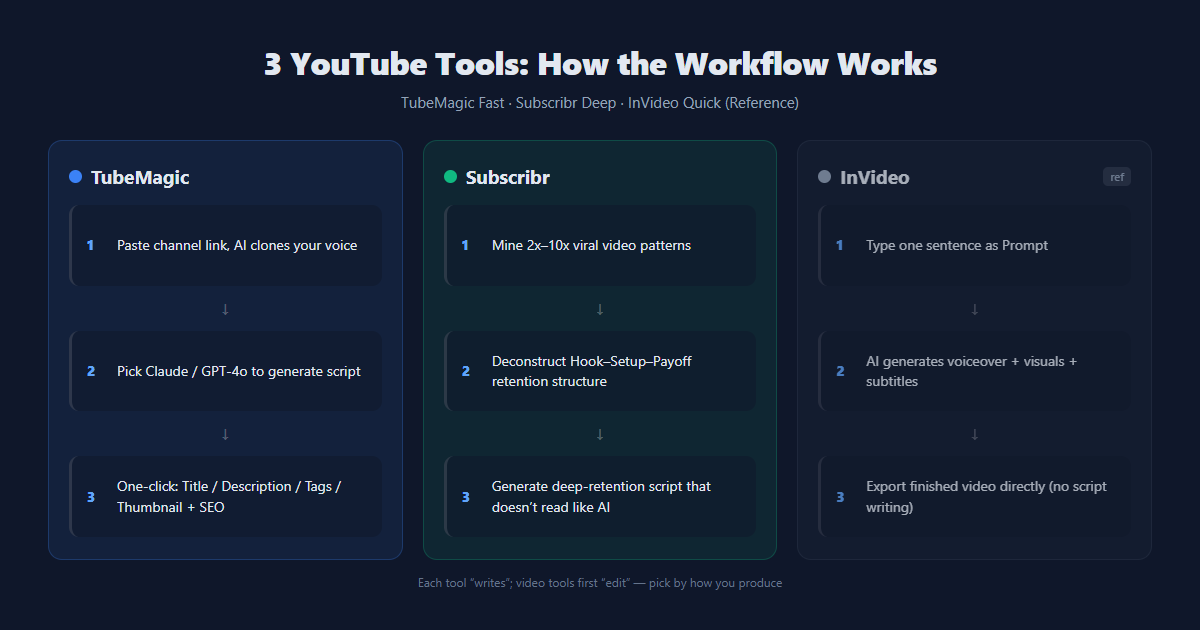
Ten-Second Verdict (TL;DR)
| Dimension | TubeMagic | Subscribr |
|---|---|---|
| Starting price | $47/mo ($41/mo yearly) | $299/yr (~$25/mo, annual only) |
| Core strength | Channel voice cloning + all-in-one YouTube SEO | Outlier-video breakdown + retention-first scripts |
| Best for | Creators who edit their own footage but hate writing scripts and SEO | Long-form channels that live and die by watch time |
| Video output | ❌ Scripts and text only | ❌ Scripts and text only |
| Billing | Monthly or yearly | Annual only, credits consumed by script length |
One line: TubeMagic is fast, Subscribr is deep. Both are script tools. Neither makes the video. If you want a finished video from a single prompt, that's InVideo's job — we get to it at the end.
In a hurry? Skip straight to the tools:
TubeMagic — highlights (from user reviews & official docs)
- Paste your channel link and it learns your voice. No prompt engineering.
- One subscription covers scripts, titles, descriptions, tags, thumbnails, and SEO.
- No generation caps to worry about (standard models 100 runs/day per tool, 500 premium credits/month), works across multiple channels.
- 30-day money-back, no questions asked.
TubeMagic — watch-outs (from user reports)
- No free trial (official reason: spam abuse). You pay first, refund later.
- Low-frequency uploaders lose here — at 1-2 videos a month you're paying $12+ per video.
- AI drafts still need a human pass. Don't paste straight to upload.
Subscribr — highlights (from user reviews & official docs)
- Ideas don't come from guessing. It scans your niche for outlier videos pulling 2x-10x normal views and turns them into repeatable structures.
- Scripts are built for retention — hooks, setup, payoff come from templates, and it reads like a plan, not AI soup.
- Built-in competitor tracking with a weekly trend digest.
Subscribr — watch-outs (from user reports)
- Annual billing only. $299 or $747 up front, no monthly option.
- Credits drain by script length: a 2,000-3,200-word draft costs ~6 credits; Creator's 60/month is roughly 10-12 long scripts.
- The keyword tool is weak — no search-volume data. Deep SEO still needs VidIQ or similar.
Who's behind it + how it works
TubeMagic is the former Morise.ai, founded by Priyam Raj, built for YouTubers who want to make content without obsessing over optimization. Three technical things matter. First, voice cloning — paste your channel link and it reads your past videos' wording and pacing, so drafts come out in your register, not generic AI voice. Second, multi-model switching — Claude or GPT-4o, with Claude recommended for a more natural flow. Third, training data — TubeMagic says it's trained on 10,000+ viral hook structures, aimed at high-retention scripts. Its Warp Upload SEO analyzes your video's audio/visual cues to generate metadata, claimed to lift search visibility.
Subscribr goes a different route. It starts with outlier mining — scanning channels to find videos pulling 2x-10x more views than normal. Those are your blueprints. It breaks down their title structure, psychological hook, and thumbnail concept, then rewrites them for your niche. When it writes, it follows retention templates (Hook-Setup-Payoff) and learns your style from your past transcripts. Plainly: TubeMagic teaches you how to write fast. Subscribr teaches you how to make people watch till the end.
Head-to-head: three dimensions
1. Script quality — and what the output actually feels like
Based on third-party field tests (OutlierKit) and official output samples, the two tools draft in clearly different styles. The difference shows up in the first lines:
- Subscribr's output style opens with a withheld payoff. A hook that teases what's coming, then slow-builds the context. You want to keep reading to find out.
- TubeMagic's output style opens fast. Direct address, straight into the argument. Punchy, efficient, no warm-up.
Same topic, completely different feel. Subscribr's drafts are built for retention — logical, little filler, structured around watch time. TubeMagic's are clean and fast, with a few sentences you'd likely cut before recording. You can hear the difference in the openings.
To make it concrete, here's what that means for the same video topic — illustrative openings based on documented output styles, not pasted from either tool:
Two openings, same topic
Subscribr-style (withheld payoff): "In 1912, a single decision doomed the Titanic long before it hit the iceberg. But it wasn't the captain's mistake…"
TubeMagic-style (direct address): "Here's why the Titanic actually sank — and the 3 massive myths you still believe today!"
Same subject, two jobs: Subscribr pulls you through the setup to keep watch time; TubeMagic gets you to the point in the first sentence. Pick the style your channel's audience rewards.
This round: Subscribr — if you make long videos and can wait for them. For volume, TubeMagic's speed wins.
2. Ideas and research
TubeMagic ships an Ideas Manager, Niche Explorer, keyword research, and a channel name generator. Complete set, but they behave like generators — a pile of options, and picking the right one is on you. OutlierKit's field test put it bluntly: "writes you a beautiful script for a video nobody was looking for."
Subscribr lives here. Outlier mining, competitor tracking, weekly trend emails — it tells you which 10x video in your niche is blowing up and how to adapt it. The Research Assistant digests PDFs, articles, and images straight into your draft.
This round: Subscribr — data-driven research beats inspiration-driven generators.
3. SEO and upload optimization
TubeMagic, no contest. Titles, descriptions, tags, community posts, thumbnail generator, Warp Upload, 95+ languages, built-in plagiarism check. Run the pipeline, paste, upload.
Subscribr offers one "SEO-flavored description" option, and its keyword tool has no search-volume data. It's a writing-first product; SEO is not its lane.
This round: TubeMagic — which is exactly why many creators buy both: Subscribr writes, TubeMagic does the SEO.

Pricing (verified August 2026)
| Item | TubeMagic | Subscribr | InVideo (reference) |
|---|---|---|---|
| Entry price | $47/mo or $497/yr ($41/mo) | Creator $299/yr (~$25/mo) | Free tier, watermarked (720p, no commercial use) |
| Next tier | None — one flat plan | Automation $747/yr (~$62/mo) | Plus ~$20-28/mo (no watermark) |
| Billing | Monthly or yearly | Annual only, $7 for a 7-day trial | Monthly or yearly |
| Refund | 30-day money-back | 7-day guarantee | Per platform policy |
| Limits | 100 runs/day standard, 500 premium credits/mo | Credit-based: Creator 60/mo (~10-12 long scripts) | Metered by generation minutes |
Two things to see clearly before you pay:
Subscribr locks you in for a year. Creator $299, Automation $747 — both billed annually, no monthly escape hatch. The 7-day test costs $7. That's not a red flag — it means they're confident enough to have you test on your real channel — but only buy if you'll publish consistently for a year.
TubeMagic is unlimited but trial-less. The free trial was killed (spam abuse), replaced with a 30-day refund. That refund is backed by Paddle — the same third-party payment processor that handles your purchase — and it's a full, no-questions money-back on one email to support within 30 days. Think of it as a 30-day risk-free trial in reverse: pay first, get a full refund if it's not for you. No trial, but no real risk either.
⚠️ Source note: TubeMagic prices cross-verified against the official site and multiple independent reviews (August 2026). Subscribr's pricing page is dynamically rendered; figures here are per third-party verification of June 2026 (Creator $299 / Automation $747, annual only). Confirm the live numbers on the official site before buying. Prices change.
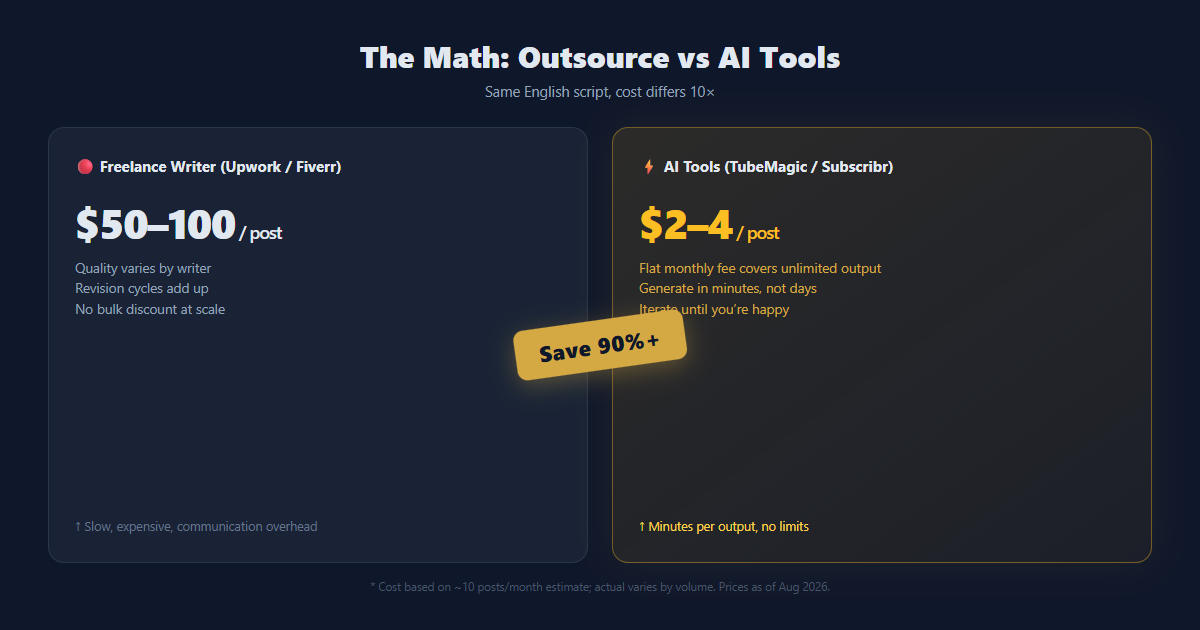
The decision tree
- You edit your own footage but can't write native English scripts and find YouTube SEO a black box ➔ TubeMagic. Paste your channel link, get a script plus titles, description, and tags in one pass. Monthly billing, and 30 days to bail.
- You make knowledge, documentary, or deep-commentary content and care about retention and story ➔ Subscribr. Outlier research plus retention-structured scripts that read planned, not generated. Accept the annual commitment.
- You publish 1-2 videos a month as a side hobby ➔ Buy neither. There's no free TubeMagic, and Subscribr's annual fee won't pay for itself — lean on InVideo's free allowance or hand-written ChatGPT drafts.
- You don't want to learn editing at all and want a finished video from one prompt ➔ That's not what these two do. InVideo generates voiceover, stock, and captions from a prompt — the fastest on-ramp for a new faceless channel. Different category, prices in the table above.
Found your match? Here are the doors:
🚀 Try TubeMagic Risk-Free (30-Day Refund) →
🚀 Try Subscribr ($7 for 7 Days) →
💡 The power combo (how people actually run both)
Here's the workflow we heard from creators running both tools at once:
- Subscribr finds the topic and writes the deep draft — outlier data tells you what to make; retention structure keeps people watching.
- TubeMagic polishes it in your voice and generates the SEO — titles, description, tags, ready to paste.
- (Optional) InVideo turns the final script into a finished video — stock, voiceover, captions, done.
Three tools, three jobs: ideas → writing → production. Budget tight? Buy one and match it to the decision tree above.
FAQ
Do TubeMagic and Subscribr support Chinese or other non-English languages? Yes. TubeMagic covers 95+ languages across scripts, titles, descriptions, tags, and community posts — Chinese included. Subscribr writes scripts in 27 languages, including Chinese. UI language support varies; check each tool's settings after sign-up.
Is the TubeMagic refund actually painless? Yes, and it's the closest thing to a free trial. One email to support within 30 days gets a full, no-questions money-back, and both payment and refund run through Paddle, a third-party processor — not a custom in-house billing system you'd need to fight. Buy monthly first, test for a month, keep it or walk away.
Can I just use ChatGPT instead of paying for these? Partly. ChatGPT can draft decent scripts for $0–20/mo, and with enough prompt engineering it gets close. What it lacks is the YouTube-specific wiring: channel voice cloning, viral-hook training data, keyword/SEO metadata, and outlier-video research. If you enjoy building your own prompting system and doing research manually, ChatGPT works. If you want a repeatable pipeline out of the box, TubeMagic and Subscribr earn their price.
Do I need both, or can I start with one? Start with one, matched to your bottleneck. Edit your own footage and struggle with scripts and SEO? TubeMagic. Make long-form content that lives on watch time? Subscribr. Both only makes sense once one tool is clearly the bottleneck — then the combo (Subscribr writes deep, TubeMagic polishes + does SEO) covers the full pipeline.
How we wrote this
This comparison is research-based, not hands-on testing: we didn't run either tool on a real account. Conclusions draw on official feature and pricing pages, official creator endorsements (Matt Par, AI Guy, Randolph, and others), independent reviews (OutlierKit, Websites2Know, Product Insight AI, Toolradar), and community feedback, verified August 2026. Negative points come from real user reviews, softened. Prices change — confirm on the official sites before buying.
Affiliate disclosure
This article contains affiliate links. If you buy through one, we may earn a commission. It does not affect our coverage, our scores, or what we say. We only write about tools we'd actually use.
Sources: tubemagic.com, subscribr.ai; OutlierKit, Websites2Know, Product Insight AI, Toolradar, AITool Review (verified June–August 2026).
P.S.: Want the exact 5-step workflow we use to go from a blank page to a publish-ready script in one sitting? Drop your email and we'll send you the free checklist.
Pros & Cons
Pros
- TubeMagic: one flat price, unlimited generation, channel voice cloning + full SEO suite in one place
- Subscribr: outlier-driven ideas and retention-focused scripts that read less like AI
Cons
- TubeMagic: no free trial, monthly price stings for low-frequency uploaders, scripts still need a human pass
- Subscribr: annual billing only, credits consumed by script length, keyword tool lacks search-volume data
Interactive picker
Which AI script tool fits you?
Three questions, one honest answer — TubeMagic, Subscribr, InVideo, or neither. No sign-up needed.
Some links on this page are affiliate links. Read our disclosure.
Annie Cole
Lead Reviewer & Software EditorAnnie Cole leads Toolisme's Software category. With a background in content marketing and journalism, she built the scoring rubric used across all reviews and has hands-on tested 40+ SaaS tools. She focuses on project management, CRM, and AI writing assistants.