Creator & Digital Nomad Security Guide: Password Managers, VPNs, and the 3-2-1 Backup Rule

By Bill Hartman · Security Editor & Researcher
Bill Hartman tests and researches privacy tools and online security. He runs Toolisme's annual security survey and writes the deep-dive VPN comparisons that keep our recommendations honest. Every claim links to primary sources — vendor docs and independent audits.
The creator's nightmare isn't malware — it's a stolen account, a dead drive, or a cafe Wi-Fi sniffing your session. Layer your defenses: a password manager plus authenticator (and Passkey), a no-logs VPN with a kill switch, and a 3-2-1 backup you actually run.
Picture the failure modes creators actually hit: an account takeover that wipes years of work and a following built overnight, or a dead drive that loses months of edits mid-project. These aren't edge cases — account takeovers and drive failures are among the most commonly reported creator disasters, and they're exactly what the layers below are built to prevent.
Here's the uncomfortable part: before it happens, most creators think the same thing. "I'm nobody. Hackers don't care about me."
Security isn't about how important you are. It's about habits. And it isn't about buying a stack of security software either — it's about layered defense: no single layer stops everything, but stacked together they stop the crashes that actually happen to creators — a stolen account, a sniffed session, a dead drive.
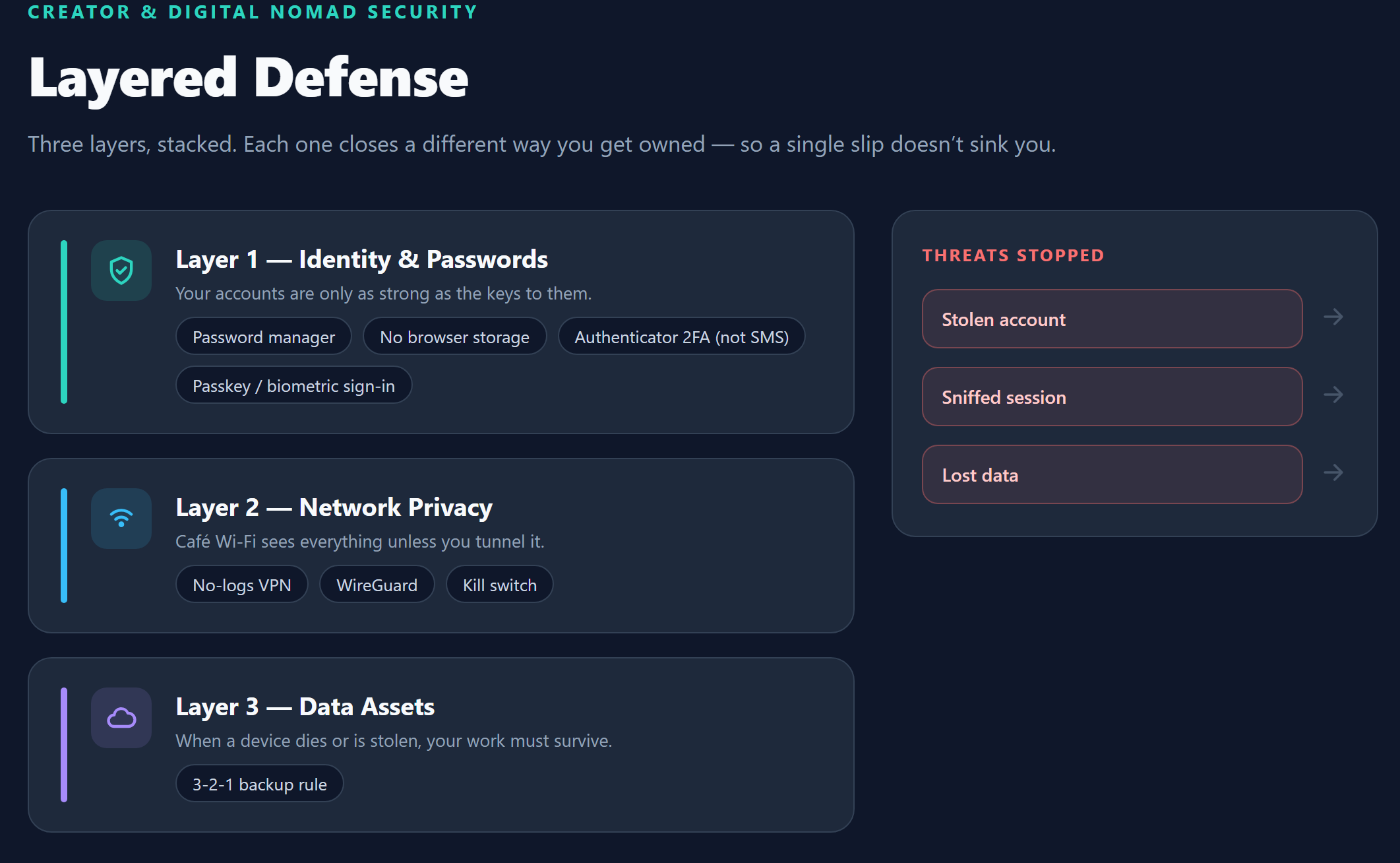
Layer 1: Identity & Passwords
Drop the habit of letting your browser save passwords. It's not a technical problem, it's a usage problem: the vault lives inside one browser, so switching devices or reinstalling your OS means your passwords don't travel with you. And if that browser ever gets hit by a malicious extension or script, your whole vault is exposed. Add the classic "one password everywhere" habit on top and a single breach unlocks your entire life.
When you pick a password manager, the real question is where your vault lives:
- Managed cloud sync — phone, laptop, tablet, all of it, always available. 1Password is the standard here: smooth, polished, zero maintenance. Right choice if you don't want to babysit infrastructure.
- Self-hosted / open source — the vault lives on your own server, data stays in your hands. Bitwarden is the usual pick here. Right choice if you care about data sovereignty and don't mind a little setup.
Neither is strictly better. Want convenience, buy managed. Want ownership, self-host.
2FA: stay off SMS whenever you can. SMS codes can be intercepted via SIM-swap attacks, and the cases keep piling up. Use an authenticator app (Google Authenticator, Authy, that family) or a hardware key (YubiKey and friends). Our rule: every critical account — email, password manager, payments, domains — gets an authenticator app. The password manager itself is the first one to protect, because it's the master key to everything else.
Passkey is worth its own paragraph. Google, Apple, and password managers like 1Password have all pushed Passkey mainstream — you sign in with device biometrics (fingerprint or face) instead of a password. It kills the "memorize another password" problem, and it's structurally immune to most phishing, because there's no password to steal. We recommend turning Passkey on wherever a service offers it — faster to log in, and nothing new to remember. It's one of the lowest-effort upgrades on this entire list.
Layer 2: Public Networks & Privacy
Cafe, airport, and hotel Wi-Fi are the daily reality of any remote worker — and they're where man-in-the-middle attacks happen. You don't need to be a genius to pull it off: anyone on the same network can run a packet sniffer and read unencrypted sessions. If you work from public Wi-Fi at all, a VPN is your umbrella — but the choice of VPN matters.
Three rules for picking a VPN. Miss one, walk away:
- No-logs policy — the provider claims not to record your browsing or traffic. Read the actual terms, not the marketing page.
- WireGuard support — the newer protocol: faster connections, better performance, lower battery drain than the old OpenVPN.
- Kill switch — if the VPN drops, network traffic cuts off automatically instead of leaking unprotected.
⚠️ The rule that saves you: if a VPN is free, you're probably not the customer — you're the product. Never send traffic that contains cookies or login credentials through a free VPN.
Free VPNs have to make money somehow. Usually it's ads, selling your bandwidth as exit nodes, or the logs themselves being the product. If you take privacy seriously, free VPN is the one category to avoid — use a reputable paid service, or just fall back to your phone's hotspot when you need quick coverage.
💡 Want real-world speed and server tests on the mainstream VPNs? Our 2026 VPN comparison will fill in the numbers once it ships.
Layer 3: Data Assets & the 3-2-1 Backup Rule
Accounts secured, you still need to survive physical disasters — a dead drive, a stolen laptop, ransomware. The standard is the 3-2-1 rule:
- 3 copies of your data — the original plus at least two backups;
- 2 different media types — never everything on one disk (local external drive + cloud);
- 1 copy offsite — physically somewhere else (cloud, or a server in another city).
Applied to how creators actually work:
- Video footage / edit projects: working directory + external drive (regular full backup) + cloud cold storage (archive a copy when a project wraps).
- Code repos: your git remote is already an offsite copy — just export important branches to the cloud now and then. Don't duplicate the whole repo.
- Finance / contracts: encrypt, compress, store in the cloud, and keep a paper or offline copy locally.
The Security Self-Check List
Framework done, here's the checklist. Tick them off, and start with the one that hurts most:
- Password manager enabled; browser password storage turned off
- No repeated passwords — at minimum, email and payments are unique
- Authenticator 2FA on email, password manager, payments, domains
- Public Wi-Fi → VPN or phone hotspot only
- VPN confirmed: no-logs terms, WireGuard, kill switch
- Data backed up per 3-2-1; last backup within 1 month
- Recovery codes / phone recovery set on the password manager and key cloud accounts
Bottom Line
Security isn't a one-time project; it's a set of habits. A password manager plus authenticator, a serious VPN, and a 3-2-1 backup — do those three and the three crashes creators actually hit — stolen accounts, sniffed public networks, lost data — each have a safety net.
We're shipping deep-dive reviews of the security tools (password managers and VPNs, tested side by side) — save our Security category page to catch them, or browse all buyer's guides if you want the frameworks first.
P.S.
This is the security pillar of our guide series. The password manager and VPN deep-dives (1Password, Bitwarden, and the VPN lineup) are coming — bookmark Security reviews and we'll see you there when they land.
Bill Hartman
Security Editor & ResearcherBill Hartman tests and researches privacy tools and online security. He runs Toolisme's annual security survey and writes the deep-dive VPN comparisons that keep our recommendations honest. Every claim links to primary sources — vendor docs and independent audits.